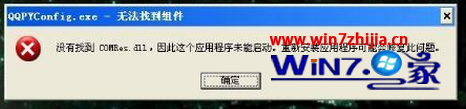
此問題多由病毒變種替換系統檔 comres.dll,並利用 Eventlog 服務啟動自身,導致程式無法啟動。
comres.dll
C:/WINDOWS/system32/dllcache
c:/windows/system32
regsvr32 comres.dll
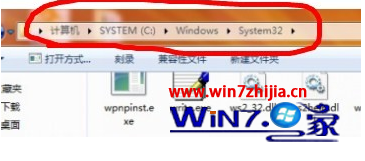
C:\Windows\System32
完成上述步驟後重開機,錯誤提示即可消除。
安裝 Windows 7 RC 前必知 5 大關鍵:安裝方式、全新安裝、驅動備份、非破壞安裝、硬碟需求
Win 7 家長控制快速上手:限制使用時間、遊戲分級、程式存取
Windows 7 關閉 UAC 後側邊欄無法使用?註冊表修改 AllowElevatedProcess 恢復
Win7 32位旗艦版快速設定定時關機指令教學
Windows 7 自訂視窗顏色混合器:調整色相、飽和度、亮度打造專屬介面
Win7 旗艦版內建刻錄功能:無需第三方軟體輕鬆燒錄資料光碟
Windows 7 內建 BitLocker To Go 為隨身碟加密:原生、免安裝、跨版本相容
IE 跳出「網頁正在存取其控制範圍外的資訊」?兩招徹底關閉跨域提示