進入 BIOS
開機時依畫面提示快速按 F1、DEL 或 F2 進入 BIOS 設定介面。
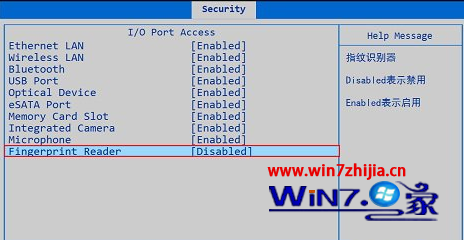
停用指紋辨識
- 選擇「Security」→「I/O Port Access」。
- 將「Fingerprint Reader」設為「Disabled」。
- 儲存並離開(通常 F10 → Yes)。
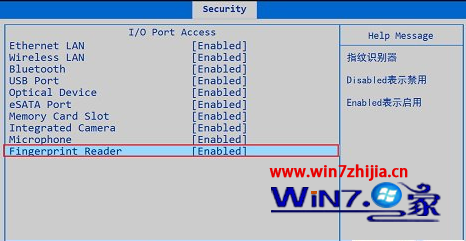
啟用指紋辨識
- 重新進入 BIOS,「Security」→「I/O Port Access」。
- 將「Fingerprint Reader」設為「Enabled」。
- 儲存並離開,正常開機。
此設定控制硬體層面的指紋感應器電源,停用後裝置管理器將不顯示該裝置,亦無法在 Windows 中使用指紋登入。