Windows XP Windows 7 Windows 2003 Windows Vista Windows 綜合教學 Linux 系統教學
Windows 10 Windows 8 Windows 2008 Windows NT Windows Server 電腦軟體教學

Win10 更新 KB3081449 失敗錯誤 0x80070032 解決:清除快取與 DISM 修復

編輯:Win10 系統基礎知識

Win10 更新 KB3081449 出現 0x80070032 錯誤。提供兩階段修復:清除更新快取、DISM 系統映像修復。
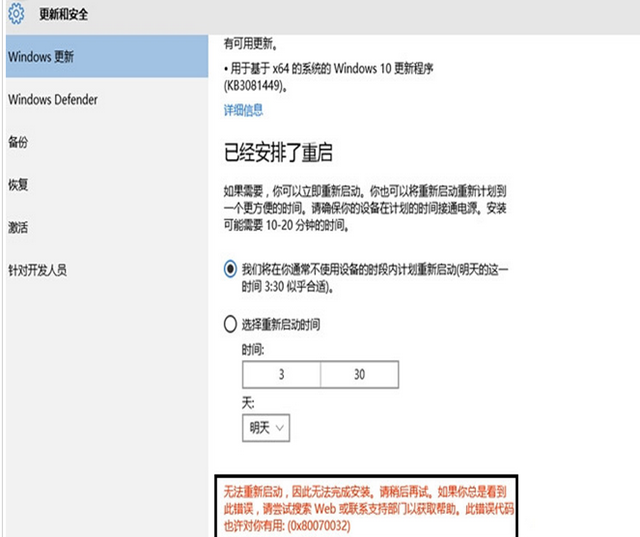
更新錯誤畫面

階段一:清除 Windows Update 快取

  1. Win+X → 「命令提示字元 (系統管理員)」
  2. net stop wuauserv
  3. 開啟 C:\Windows\SoftwareDistribution → 刪除 Download、DataStore 資料夾內所有檔案
  4. net start wuauserv
  5. Windows Update 重新檢查更新

階段二:DISM 修復系統映像 (階段一無效時)

  1. 系統管理員 CMD 依序執行:
    Dism /Online /Cleanup-Image /CheckHealth
    Dism /Online /Cleanup-Image /ScanHealth
    Dism /Online /Cleanup-Image /RestoreHealth
  2. 重開機後重新更新

原理

  • 0x80070032 多為更新快取損毀或元件存放區不一致
  • 清除快取強制重新下載
  • DISM 掃描/修復 WinSxS 元件存放區

通用更新失敗排查

  • 執行 sfc /scannow 修復系統檔案
  • 確認磁碟空間充足 (C: > 10GB)
  • 暫停第三方防毒/安全軟體
  • 網路穩定、時間同步正確
Copyright © Windows教程網 All Rights Reserved