Apple 於 macOS Sierra 10.12.5 更新中加入 Boot Camp 對 Windows 10 Creators Update (1703) 的官方支援。Mac 用戶可透過以下步驟安裝最新 Win10:
前置需求
- Mac 機型支援 Boot Camp(2012 年後機型多支援)。
- 升級 macOS 至 10.12.5 或更新版本。
- 下載 Windows 10 Creators Update 官方 ISO(微軟官網 Media Creation Tool 或 MSDN/I Tell You 站點)。
- 準備 16 GB 以上 USB 隨身碟(Boot Camp 助理會自動建立安裝媒體)。
安裝步驟
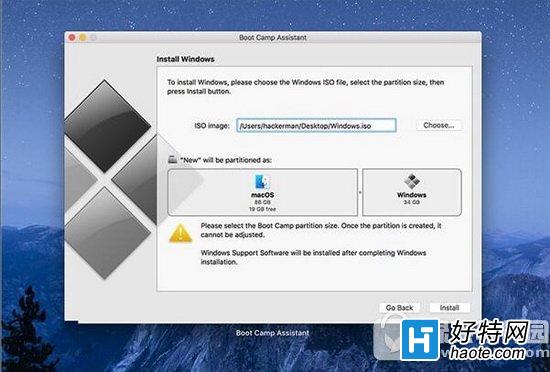
- 開啟「Boot Camp 助理」 (應用程式 → 工具程式)。
- 勾選所有任務(建立安裝磁碟、下載支援軟體、安裝 Windows),點選「繼續」。
- 選擇下載的 ISO 檔案,設定 Windows 分區大小(建議 100 GB 以上),點選「安裝」。
- Mac 重啟進入 Windows 安裝程式,依提示完成安裝(語言、時區、產品金鑰可跳過)。
- 進入 Windows 桌面後,Boot Camp 安裝程式自動啟動,安裝 Apple 專用驅動(顯卡、鍵盤、觸控板、音訊、Wi-Fi/藍牙等)。
- 重啟完成,即可在 Mac 上原生運行 Win10 創意者更新。
注意:若已安裝舊版 Win10,可直接透過 Windows Update 升級至 1703,無需重新分區安裝。但全新安裝可獲得最乾淨的環境與最佳驅動相容性。