為安全設定複雜開機密碼(參考《Windows10 設置開機密碼的技巧》),一旦忘記如何破解?利用帶 PE 功能的 U 盤清除密碼:

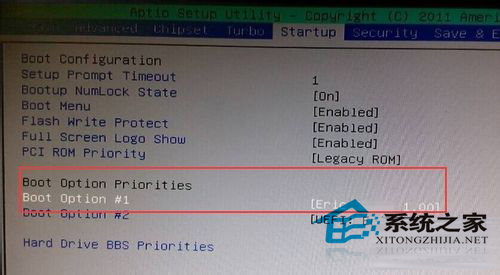
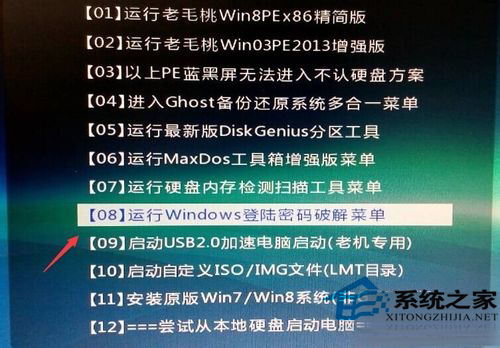
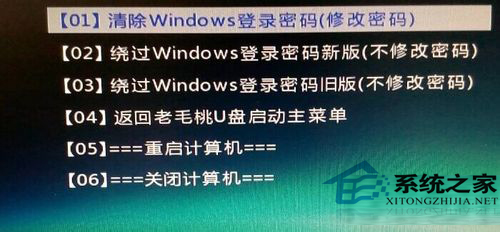
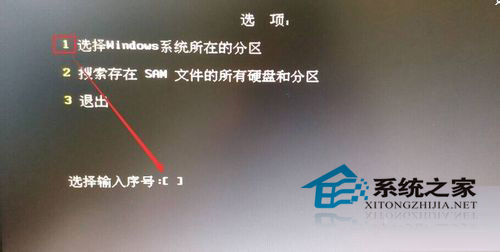
重啟拔除 U 盤後即可無密碼進入系統。注意:此僅適用於本地帳戶,Microsoft 帳戶密碼無法透過此法破解。
Win10 一鍵清空所有使用者回收站:管理員命令提示字元執行 rd 指令
Win10 檔案總管找回「收藏夾」:匯入註冊表恢復經典側邊欄
Win10 RS2 預覽版 14942 更新內容總覽:開始選單摺疊、照片 App 重設計、觸控板優化
Win10 升級助手提示「網卡不支援 Windows10」?下載官網最新支援 Win10 的網卡驅動,改用原版鏡像安裝後再裝驅動
Win10 預覽版 10159 升級失敗五大解決方案:微軟帳號驗證、修復我、快速通道切換、註冊表修正、ISO 手動升級
Win10 語言包安裝失敗?.cab 離線安裝法與 lpkcsetup 完整教學