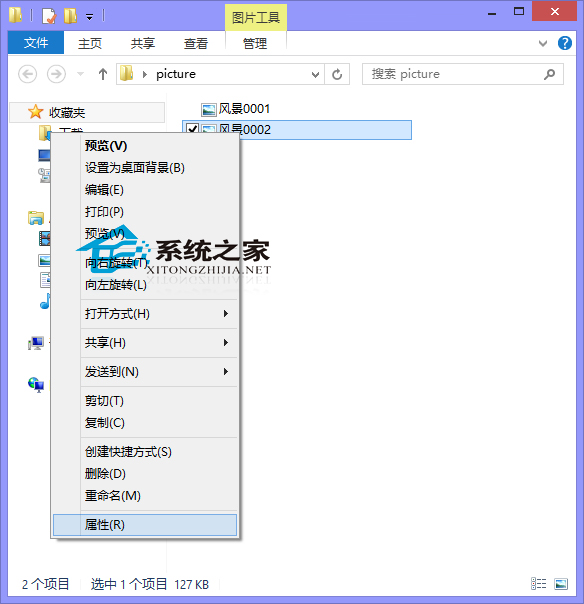
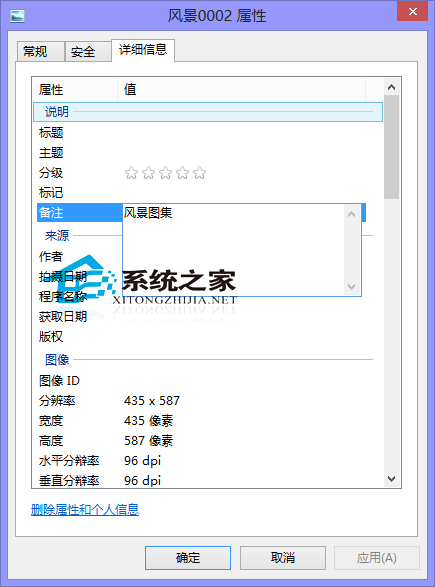
Windows 10 檔案總管支援直接編輯圖片檔案的「備註」中繼資料,無需第三方軟體:
應用場景: 攝影歸檔時記錄拍攝地點、活動主題、人物關係等資訊,配合檔案總管「搜尋」功能(輸入備註關鍵字)快速篩選。若偏好傳統「Windows 相片檢視器」,可參考《Win10 如何設定照片檢視器為預設看圖工具》。
Win10 筆電避免誤觸電源鍵關機:電源選項設定「按下電源鍵不執行任何動作」
Win10 工作列時間不顯示月份(顯示 mm)怎麼修?重設日期格式即可
Win10 System 進程佔用 CPU 過高?停用 Superfetch 服務
Win10 安裝顯示卡驅動後藍畫面?進入安全模式移除驅動再重裝相容版本
Win10 內建遊戲是什麼?微軟票選出的「拼字遊戲」長什麼樣?
如何更換 Win10 系統預設提示音?
Win10 登入 Administrator 管理員帳號(電腦管理→本地使用者和群組)
Windows 10 關閉 OneDrive 同步教學:保護隱私與節省頻寬