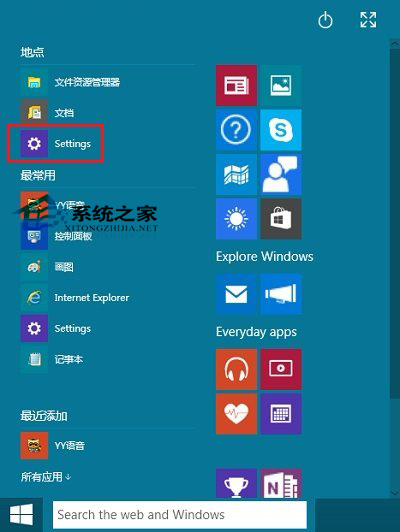
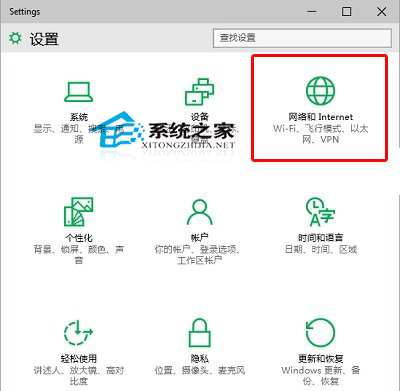
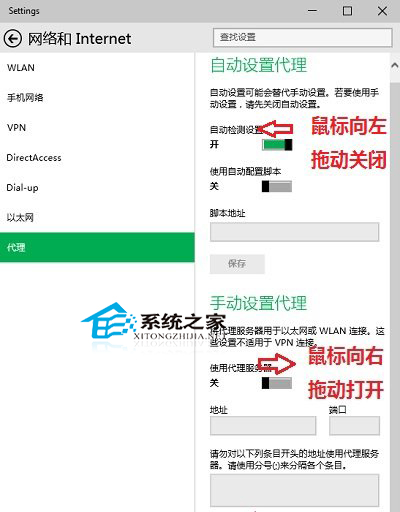
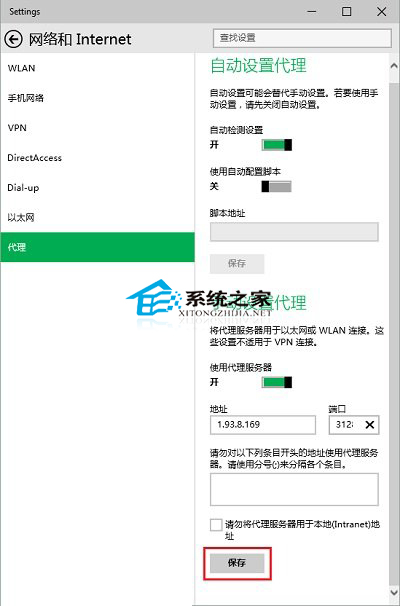
Windows 10 內建系統層級 Proxy 設定,一次設定讓所有支援系統代理的應用程式(瀏覽器、更新服務、UWP 應用等)自動走代理流量:
補充:此設定屬系統層級,不影響已硬編碼 Proxy 或使用獨立代理設定的應用程式。若需更靈活的分流規則,建議搭配第三方代理用戶端(如 Clash Verge、Netch)使用。
Win10 磁碟 100% 佔用解決:關閉 HomeGroup 服務、停用自動維護任務、關閉碎片整理排程三大方案
Windows 10 無限自動重開機怎麼解決?USB 開機進入修復環境修復啟動
Win10 查看 DirectX 版本與升級 DX12 硬體需求說明
Win10 如何綁定 Microsoft 帳號到本機電腦?
Windows 10 命令提示字元半透明效果設定教學 (實驗性功能)
Win10 IE 瀏覽器管理增益集移除多餘擴充功能提升速度
Win10 設定 Win+E 快速鍵直接開啟「這台電腦」而非「快速存取」
Win10 清除執行記錄與開始選單常用應用:個人化設定關閉「顯示最近開啟的項目」兩開關