DirectX (DX) 是 Windows 多媒體程式設計介面,Win10 內建 DX12,但能否發揮效能取決於顯卡硬體支援度。
一、確認目前 DX 版本
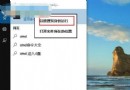
- Win + R → 輸入
dxdiag → Enter。
- 在「系統」索引標籤底部即可看到 DirectX 版本。
二、升級 DX12 的必要條件
軟體: Windows 10 (已滿足)。
硬體: 顯卡必須支援 DX12 功能層級 (Feature Level 12_0 或以上)。
僅更新系統無法升級 DX 版本,必須更換支援 DX12 的顯示卡。以下為主流顯示卡支援等級參考 (依官方白皮書整理):
AMD (Radeon) 支援等級
- 完整支援 (Feature Level 12_1): RX 400 系列及更新 (Polaris、Vega、Navi、RDNA 架構)。
- 基本支援 (Feature Level 12_0): R9 285/380 (Tonga)、R9 Fury 系列 (Fiji)。
- 相容模式 (Feature Level 11_1): HD 7000~R9 300 系列 (GCN 1.0/1.1 架構),可執行 DX12 應用但缺乏部分新特效。
NVIDIA (GeForce) 支援等級
- 完整支援 (Feature Level 12_1): GTX 900 系列 (Maxwell 2.0) 及更新 (Pascal、Turing、Ampere、Ada 架構)。
- 基本支援 (Feature Level 12_0): GTX 700/800 系列 (Kepler/Maxwell 1.0),功能受限。
- 不支援: GTX 600 系列及更早 (Fermi/Kepler 初期)。
建議:購買新顯卡前,請至廠商官網確認型號對應的 Feature Level,並更新最新顯示驅動程式以啟用完整 DX12 功能。