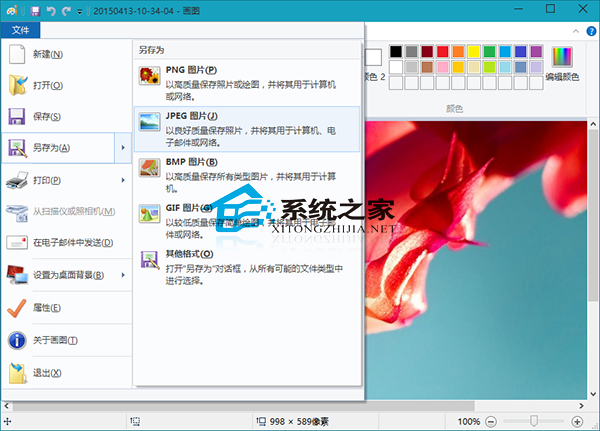
圖片格式眾多,不同情境適合不同格式。無需第三方工具,Windows 10 畫圖即可輕鬆轉檔。
畫圖工具許多年輕使用者未接觸,可參考《Windows 10 系統如何開啟畫圖工具》教學認識啟動方法。
技嘉推新款Win10游戲本:Skylake i7配GTX 980M
Windows 10 開啟裝置管理員快速教學 (這台電腦右鍵、控制台兩種方法)
Win10 開始選單資料夾無法刪除?重新開機清除快取即可
Win10 關閉「Windows 已保護你的電腦」SmartScreen 彈窗:安全性與維護中一鍵停用
Win10 滑鼠滾輪縮放網頁、桌面圖示技巧:Ctrl + 滾輪秒切換大小
Windows 10 讓資料夾提示顯示檔案大小資訊(資料夾選項設定)
Win10 同步中心位置與開啟方法完整指南
升級 Windows 10 超過 30 天後悔期,還能還原回舊系統嗎?