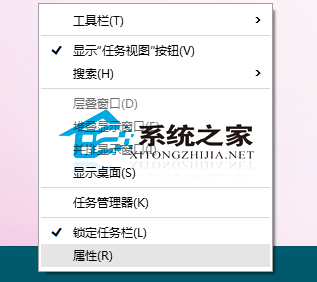
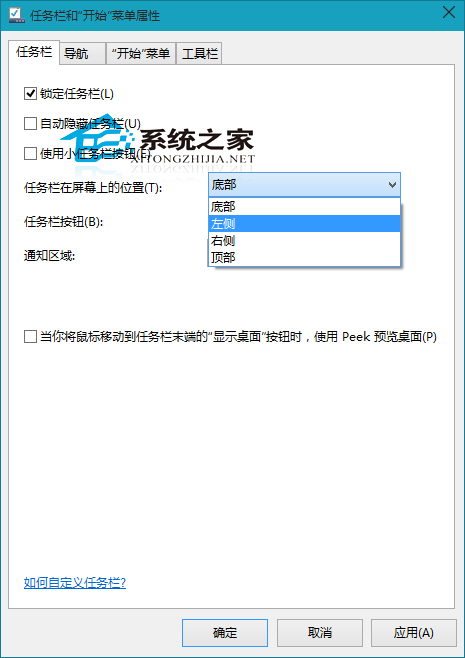
Windows 10 任務列支援四邊自由放置。若習慣左側任務列 (類 macOS Dock/Ubuntu Launcher),可在設定中變更。
同樣邏輯可放置於右側/頂部。個人化佈局提升操作舒適度。
Windows 10 移除「英文 (美國) 美式鍵盤」輸入法恢復 Ctrl+Shift 切換習慣
Win10 飛行模式關不掉/無法關閉?乾淨啟動排除第三方服務衝突,逐項驗證找出禍首
戴爾將於11月推出預裝Win10的Venue 8 Pro平板
Windows 10 將常用網站固定到開始選單的操作教學
升級 Win10 後提示「沒有權限存取網路資源」解決方法:新增 Windows 憑證
Win10 用 360 極速瀏覽器看影片卡頓?關閉多餘 Flash 外掛即可解決
Win10 Mobile 10149 解除行動網路下載大小限制
Windows 10 進入安全模式完整指南:F8 失效後的多種新方法