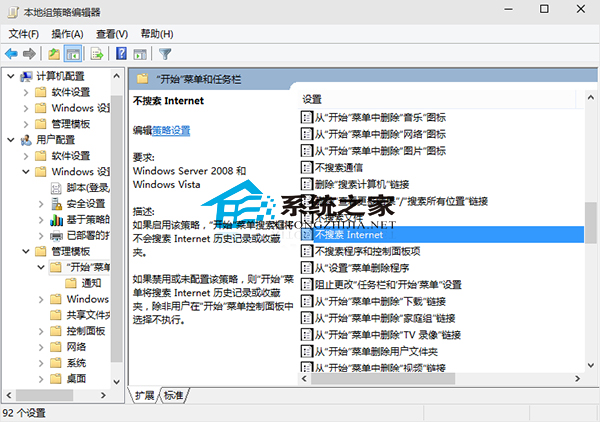
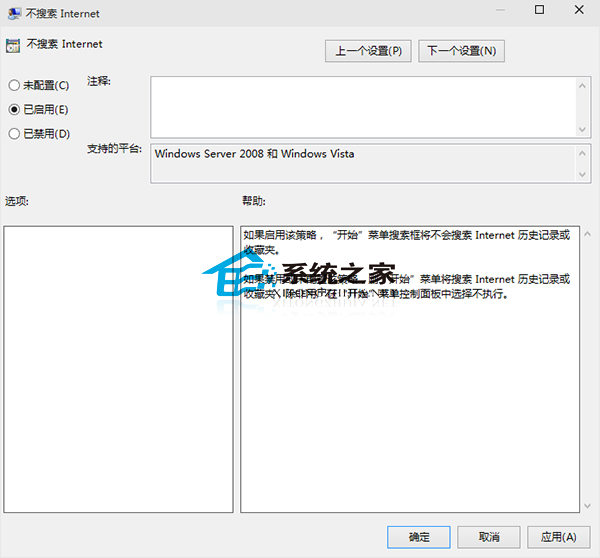
Windows 10 搜尋預設同時顯示本地與網際網路結果(歷史、收藏等)。若只想要本地結果,如何關閉網路搜尋?
gpedit.msc
套用儲存後,搜尋不再顯示網路歷史與收藏內容,結果更精準。若覺得搜尋框礙事,也可隱藏工作列搜尋框。
Win10 飛行模式關不掉?乾淨啟動排查第三方服務衝突
Win10 關機不斷電解決:Intel MEI 驅動降級至 9/10 版本
Win10密碼忘記怎麼辦?微軟官網重置圖文教程
Win10 修改鎖定畫面預設壁紙:透過登錄機碼指定自訂圖片路徑
Win10 10240 升級下載緩慢?ESD 檔案離線替換加速安裝法
微軟若推 Win10 旗艦 Xbox 手機,能否打破移動市場困局?
Win10 內建應用誤刪怎麼恢復?PowerShell 一鍵重裝圖文教學
Win 10 重設本機帳號密碼:lusrmgr.msc 圖形化操作秒搞定