Windows XP Windows 7 Windows 2003 Windows Vista Windows 綜合教學 Linux 系統教學
Windows 10 Windows 8 Windows 2008 Windows NT Windows Server 電腦軟體教學

升級 Windows 10 後 Office 無法使用?修復安裝或重新註冊解決

編輯:Win10 系統應用技巧

升級 Windows 10 後 Office (Word/Excel/PPT) 無法開啟、閃退、報錯,主要原因為升級過程中 Office 註冊資訊損壞。解決方法:

方法一:Office 修復安裝(推薦,保留設定)

  1. 準備 Office 2013/2016/2019 安裝光碟或 ISO 映像檔(掛載虛擬光碟)。
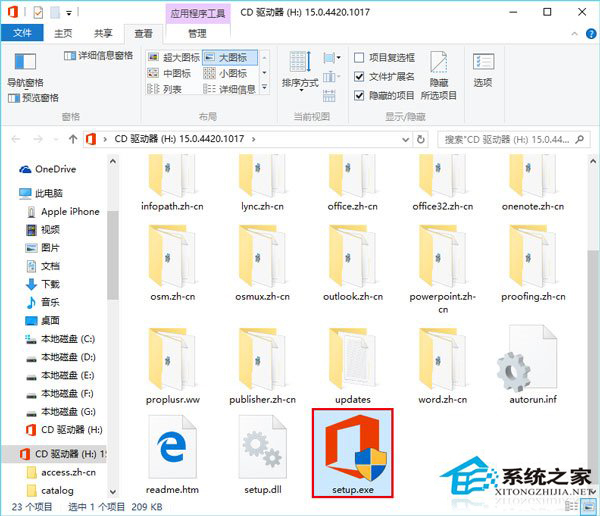
  2. 開啟光碟/映像檔,雙擊執行 setup.exe。
  3. 在安裝精靈中選擇 「修復」 → 「線上修復」或「快速修復」 → 繼續完成。

Office 無法使用

雙擊 setup.exe 修復

方法二:命令列重新註冊 Office(適用 Click-to-Run 版)

以系統管理員身分開啟 CMD,執行:
"C:\Program Files\Common Files\Microsoft Shared\ClickToRun\OfficeC2RClient.exe" /update user updatetoversion=16.0.xxxxx.xxxxx
(具體版本號請參考 Office 更新日誌)

方法三:完全解除安裝重裝

使用 Microsoft 官方 Office 解除安裝支援工具 (SetupProd_OffScrub.exe) 徹底移除 → 重新安裝。

方法一成功率最高且最簡單,建議優先嘗試。

Copyright © Windows教程網 All Rights Reserved