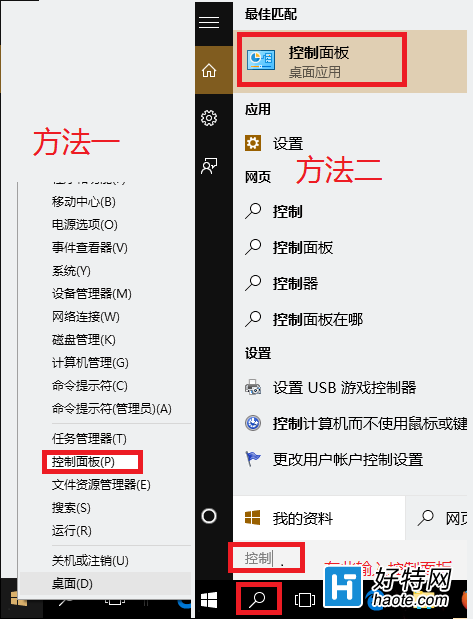
PowerShell 是強大的命令列殼層與腳本環境,Win10 中以系統管理員身分開啟有三種常用管道:
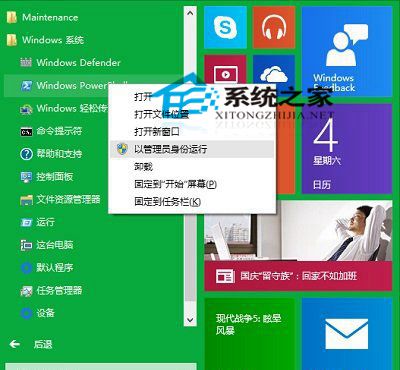
「開始」→「所有應用程式」→「Windows PowerShell」資料夾 → 右鍵「以系統管理員身分執行」。
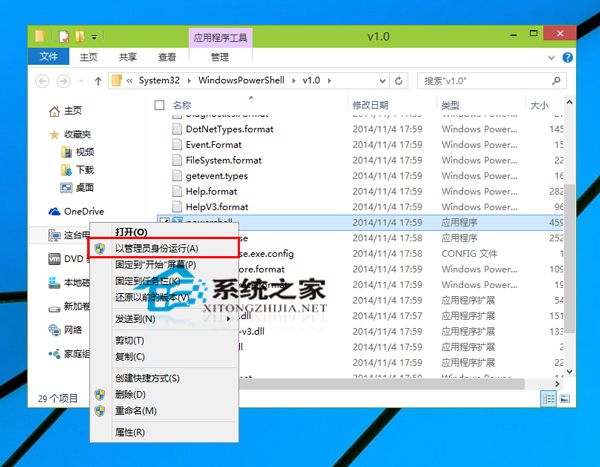
瀏覽至 C:\Windows\System32\WindowsPowerShell\v1.0\powershell.exe → 右鍵「以系統管理員身分執行」。
powershell → 右鍵結果選「以系統管理員身分執行」。powershell → Ctrl+Shift+Enter。掌握任一管道,即可隨時調用 PowerShell 強大管理功能。
Win10 內建錄音機功能使用教學:開始選單 > Windows 附屬應用程式
Win10 徹底關閉騰訊遊戲 teniodl.exe 下載進程:替換偽 EXE + cacls 拒絕所有權限防止重生
Win10 建立修復磁碟機失敗怎麼辦?檢查系統、清除 USB 空間、確保啟用狀態
Win10 10547 版本頻繁藍畫面重開機?關閉 Windows Defender 開機掃描與驅動簽名強制
Win10 多檔案右鍵選單缺少「開啟/列印/編輯」?修改登錄 MultipleInvokePromptMinimum 突破 15 項限制