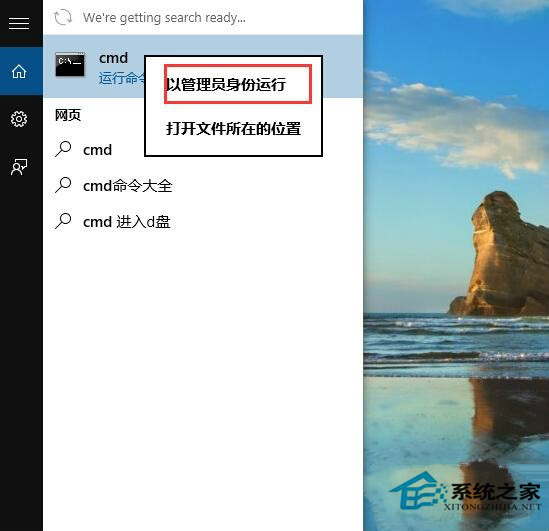
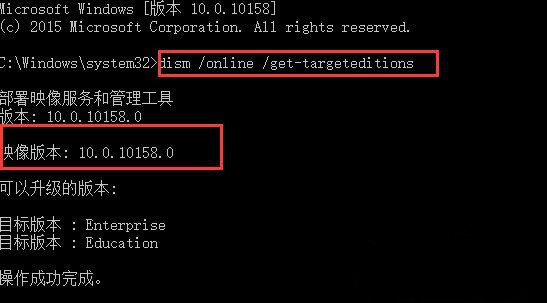
Windows 10 推出多個版本迭代,若想確認目前系統的確切映像版本(如 1507、1511、1607 等),可使用 DISM 指令快速查詢。
CMD
dism /online /get-targeteditions
若需查看更詳細的建置版本號(如 19045.xxxx),可參考「Win10 查看系統版本號的方法」。
Win10 設定無法開啟解決方案:微軟官方緊急修復工具掃描診斷自動修復 Issue 67758
Win10 無聲音?回復聲卡驅動程式版本解決
Win10 手動設置固定 IP (CMD netsh) 三步走:無需第三方軟件
Win10 筆電省電設定完全指南:5 招延長續航力
Win10 IE 瀏覽器頻繁彈出「IE 已停止運作」:關閉第三方瀏覽器擴充與自動崩潰修復解決
Win10 安全中心服務無法啟動?三大核心服務連動修復法
Win10 設定螢幕自動關閉時間:控制台→硬體和音效→電源選項→選擇關閉顯示器時間
Win10 以系統管理員身分開啟 CMD 三大法:系統資料夾、開始搜尋、Charms 搜尋