Windows XP Windows 7 Windows 2003 Windows Vista Windows 綜合教學 Linux 系統教學
Windows 10 Windows 8 Windows 2008 Windows NT Windows Server 電腦軟體教學

Win10 Edge 瀏覽器提示「未註冊的類別」?啟動 User Manager 服務修復

編輯:Win10 系統應用技巧

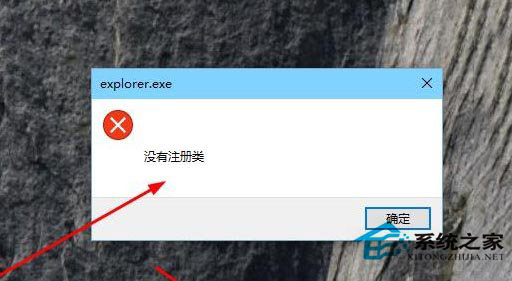
Win10 開啟 Edge 瀏覽器彈出 explorer.exe - 類別未註冊 錯誤,主因 User Manager 服務 (管理使用者工作階段/應用程式容器) 停用/損毀,服務管理員啟用即可修復。
Edge 類別未註冊錯誤
服務管理員開啟
User Manager 服務

修復步驟

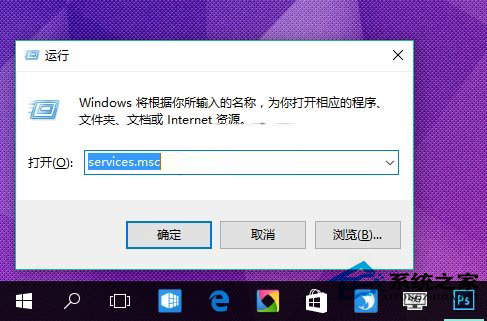
  1. Win+R > services.msc 開啟服務管理員。
  2. 尋找 User Manager (服務名稱:UserManager)。
  3. 若狀態非「執行中」:右鍵 > 「內容」 > 啟動類型改「自動」 > 「套用」 > 「啟動」。
  4. 若啟動失敗:檢查依賴服務 Remote Procedure Call (RPC)、DCOM Server Process Launcher 是否執行。
  5. 重新開機或重新啟動 explorer.exe 驗證 Edge 正常開啟。

進階修復 (服務啟動仍失敗/損毀)

  1. 系統檔案修復:管理員命令提示字元 sfc /scannow + dism /online /cleanup-image /restorehealth。
  2. PowerShell 重新註冊 Edge:
    Get-AppXPackage -Name Microsoft.MicrosoftEdge | Foreach {Add-AppxPackage -DisableDevelopmentMode -Register "$($_.InstallLocation)\AppXManifest.xml"}
  3. 建立新使用者帳號測試,若新帳號正常則為舊使用者設定檔損毀,遷移資料至新帳號。

核心關聯

UserManager 服務負責 UWP 應用程式 (含 Edge) 的使用者工作階段建立、權限權杖發行、應用程式容器生命週期管理。服務異常導致 Edge 無法建立正確執行環境,拋出 COM 類別未註冊錯誤 (REGDB_E_CLASSNOTREG / 0x80040154)。

啟動 User Manager 服務修復 Edge「類別未註冊」錯誤,直擊 UWP 執行環境核心依賴,附 sfc/dism 與 AppX 重新註冊進階方案。

Copyright © Windows教程網 All Rights Reserved