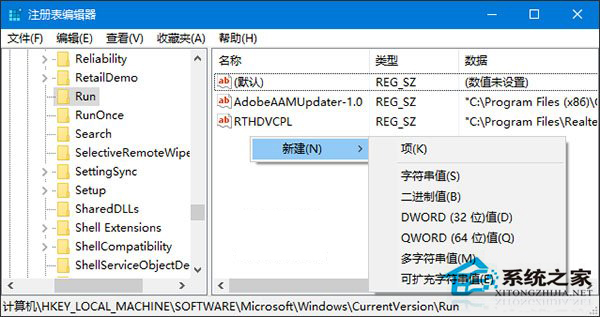
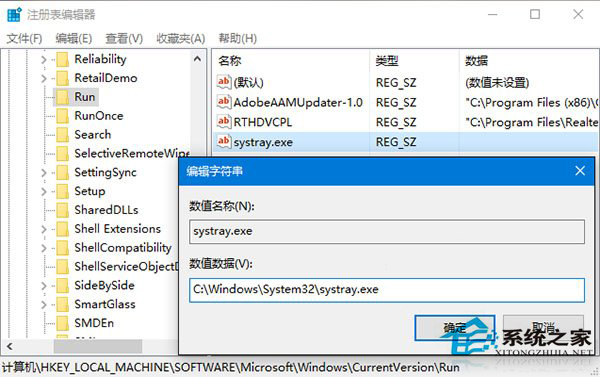
通知區域音量圖示消失,且「開啟或關閉系統圖示」中音量項目呈灰色無法切換,透過註冊表補回 systray.exe 啟動項即可修復。
systray.exe
regedit
HKEY_LOCAL_MACHINE\SOFTWARE\Microsoft\Windows\CurrentVersion\Run
C:\Windows\System32\systray.exe
此法解決音量圖示灰色無法啟用問題。
Win10 系統最全面優化設定:關閉家庭群組、移除預裝應用、停用優化磁碟排程、關閉系統保護、禁用 IPv6
Windows 10 開啟「系統屬性」的三種經典方法
Windows 10 開啟內建 Windows Defender 防毒軟體完整教學
Win10 開啟 Edge (Spartan) 瀏覽器:新圖標辨識與啟動路徑說明
Win10 更換預設瀏覽器 (取消 Edge 預設資格) 系統級設定法
Windows 10 無法按 F8 進入安全模式?一鍵啟用傳統開機選單
Win10 快速啟動選項變灰無法勾選?透過群組原理強制啟用
曝光:疑似Surface Mobile配置:5.5吋2K屏、Atom x3、4GB RAM、Surface Pen