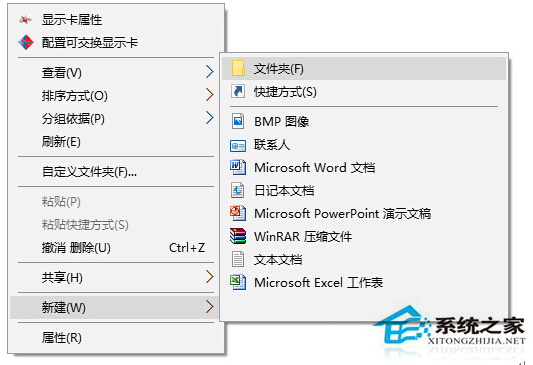
Win10 新建項目預設以「新建 + 類型」命名,透過註冊表可自訂前綴文字,甚至留空僅保留副檔名。
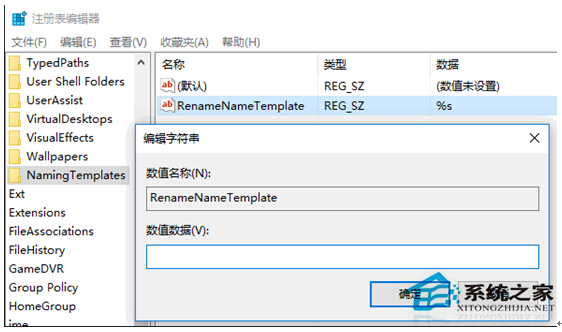
regedit
HKEY_CURRENT_USER\SOFTWARE\Microsoft\Windows\CurrentVersion\Explorer
RenameNameTemplate
%s
善用此法可將「新建」兩字替換為任何喜好文字。
Windows 10 禁用開始選單、工作列、動作中心透明效果(登錄修改)
Win10 開啟「電腦設定」的兩種快速方法
Win10 進入飛行模式無法退出?乾淨啟動排除第三方服務衝突(含軟媒魔方操作法)
Win10 RS2 預覽版 14942 更新內容總覽:開始選單摺疊、照片 App 重設計、觸控板優化
Win10 解除 Microsoft 帳號綁定,改用本機帳號登入
Windows 10 應用商店下載的應用安裝在哪裡?查看隱藏目錄完整教學
Win10 限制使用者關機操作:群組原則與註冊表雙法防止誤關機、保護重要任務
Win10 Edge開發平台將迎大波更新:CSS偽類、表單元素、WebRTC等