雙擊無預設開啟程式的檔案時,Win10 會彈出「在商店中尋找應用」提示。若習慣自行指定程式,可透過註冊表關閉此干擾。
regedit 開啟登錄編輯器。HKEY_LOCAL_MACHINE\Software\Policies\Microsoft\Windows\ExplorerNoUseStoreOpenWith。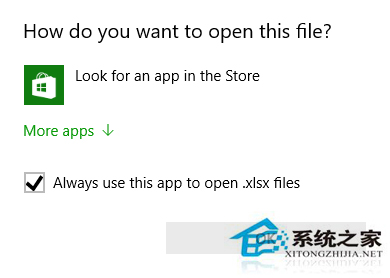
之後雙擊無關聯檔案將直接彈出「開啟方式」對話框,不再強制導向商店。
Windows 10 揚聲器音質進階調整:預設格式採樣率/位深度與空間音效
Windows RT 8.1 Update 3 推送:帶來類 Win10 開始選單、改良鎖畫面、不支援升級 Win10
Win10 刪除主題:個人化視窗刪除自訂主題、主題資料夾刪除系統預設主題
Win10 開啟/停用系統服務:services.msc 服務管理員統一管理所有服務
Windows 10 登陸 Xbox One 延至秋季 跨平台遊戲成核心亮點
Windows 10 10166 開始選單卡死?移除 Phone Companion 磁貼即刻解決