微軟於 2015 年 9 月推送 Windows RT 8.1 Update 3,為 Surface RT/2 使用者帶來類 Windows 10 開始選單體驗、改良鎖畫面介面。這是 Windows RT 平台最後一次功能更新,因架構限制 (ARM 32-bit) 無法升級 Windows 10。本文整理更新內容、適用裝置、歷史意義。
Update 3 核心更新內容
| 功能 | 描述 | 對應 Win10 功能 |
|---|
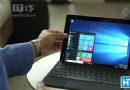
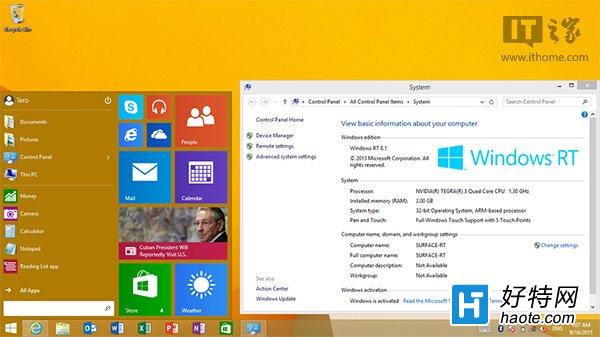
| 開始選單 | 全新設計,左側應用程式清單、右側動態磚、可調整大小、支援資料夾分組 | Windows 10 早期預覽版開始選單 (Build 98xx-100xx) |
| 鎖畫面 | 新增相機快速存取、詳細通知內容、背景圖片輪播 (Windows Spotlight 前身) | Windows 10 鎖畫面核心功能 |
| 檔案總管 | 新增「首頁」快速存取、詳細資訊窗格改良 | Windows 10 檔案總管首頁 |
| 系統效能 | 優化記憶體管理、減少懸置讀寫、改善觸控回應 | 基礎架構優化 |
| 安全性更新 | 包含至 2015 年 9 月的所有安全性修補 | 定期累積更新機制前身 |
適用裝置與安裝方式
- Surface RT (NVIDIA Tegra 3, 32GB/64GB)
- Surface 2 (NVIDIA Tegra 4, 32GB/64GB)
- 其他 Windows RT 裝置:Dell XPS 10, Lenovo IdeaPad Yoga 11, Asus VivoTab RT, Samsung ATIV Tab 等
- 安裝方式:設定 → 變更電腦設定 → 更新與修復 → Windows Update → 檢查更新 → 下載安裝 Update 3 (KB3033055)
Windows RT 平台歷史回顧與遺憾
架構限制:ARM 32-bit 成絕響
- Windows RT 僅支援 ARM 架構應用程式 (Windows Store 應用),無法執行 x86/x64 傳統桌面程式
- Office 2013 RT 為唯一預裝桌面級生產力套件 (Outlook 缺席,改用郵件/行事曆 Modern 應用)
- Windows 10 核心最低需求 x86/x64,ARM64 支援需等到 Windows 10 on ARM (2017 年末 Snapdragon 835 平台)
市場定位混淆
- 消費者誤以為「能跑 Windows 程式的平板」,實際僅能跑 Modern 應用
- 價格接近 Intel Core i 系列 Surface Pro,效能卻大幅落後
- 應用生態發展緩慢,開發者缺乏投入誘因
Update 3 為「最後禮物」
微軟承諾提供安全性更新至 2018 年 1 月 (延長支援結束),但功能更新止步於 Update 3。Surface RT/2 使用者無法體驗 Windows 10 通用應用平台 (UWP)、Cortana、Edge、Windows Hello、虛擬桌面、DirectX 12 等核心創新。
社群延續方案
- Windows RT 8.1 繼續使用:離線辦公、媒體播放、輕量瀏覽仍可勝任
- Linux 移植專案:社群嘗試在 Surface RT 移植 Ubuntu/Debian/Arch Linux ARM 版本,但驅動程式 (GPU 加速、觸控、電源管理) 完整度有限
- 收藏保存:作為微軟硬體設計里程碑 (鎂鋁合金一體成型、踢架、Type Cover 概念驗證) 典藏
啟示:Windows RT 失敗推動微軟重新思考跨架構策略:Windows 10 採用 OneCore 統一核心,支援 x86、x64、ARM64;UWP 通用應用平台確保應用跨架構執行;Windows on ARM (WoA) 透過 x86 模擬層解決傳統應用相容性;Surface Pro X (SQ1/SQ2 晶片) 為 ARM 版 Surface 正名。RT 時代的教訓,成就今日跨架構 Windows 生態基石。