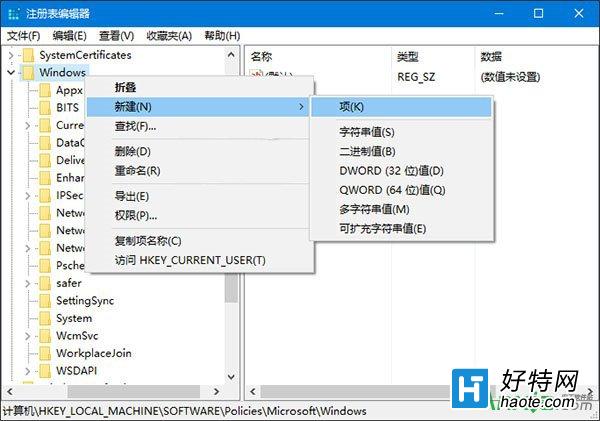
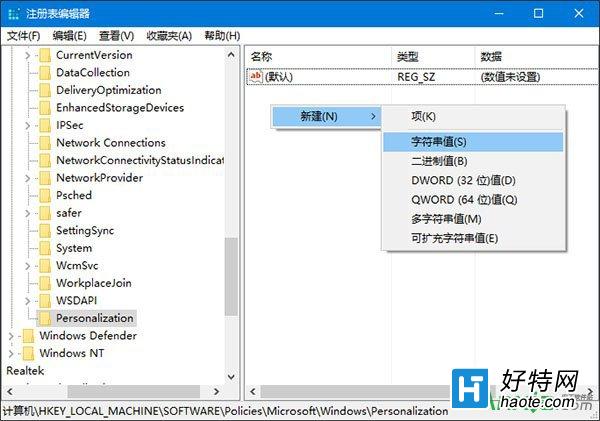
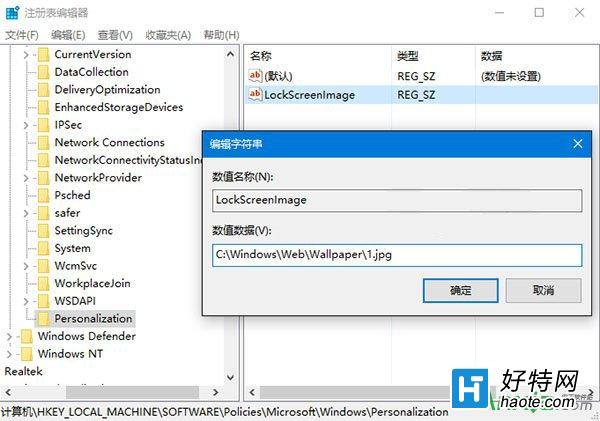
想統一企業/公共電腦默認鎖屏壁紙,又不阻止用戶自定義?註冊表法:
regedit
HKEY_LOCAL_MACHINE\SOFTWARE\Policies\Microsoft\Windows
Personalization
LockScreenImage
C:\Windows\Web\Screen\CustomLock.jpg
生效後新用戶/重置用戶默認見此壁紙,用戶在「個性化」自行更換不受影響。操作前建議建立系統還原點。
迎接後 IE 時代:Microsoft Edge 瀏覽器更新日誌官網正式上線
Windows 10 設定自動同步網路時間的方法
Win10 筆電敲擊機殼有迴音怎麼辦?關閉麥克風「監聽此裝置」功能
Win10 系統修改 Microsoft 帳戶密碼的完整圖文教學
Win10 桌面底部空出一大排?Ctrl+滾輪縮小圖示 + 勾選「自動排列」秒修復
Win10 註冊表關閉任務列視窗預覽:ExtendedUIHoverTime 與 NumThumbnails 兩值雙重阻擋
Win10 音量圖示灰色無法開啟?註冊表修復 systray.exe
Windows 10 新版開始選單使用指南(Build 9926 變化詳解)