Windows XP Windows 7 Windows 2003 Windows Vista Windows 綜合教學 Linux 系統教學
Windows 10 Windows 8 Windows 2008 Windows NT Windows Server 電腦軟體教學

Win 10 PowerShell 批量建立資料夾:mkdir $(1..10 | %{"IThome$_"}) 一鍵生成編號資料夾

編輯:Win10 系統應用技巧

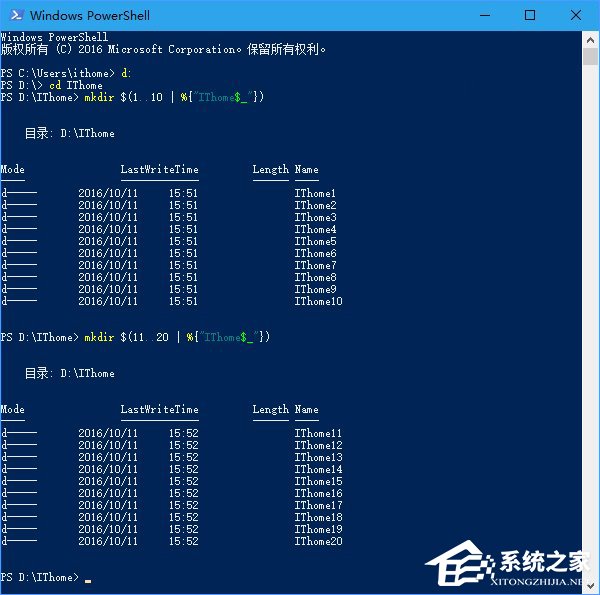
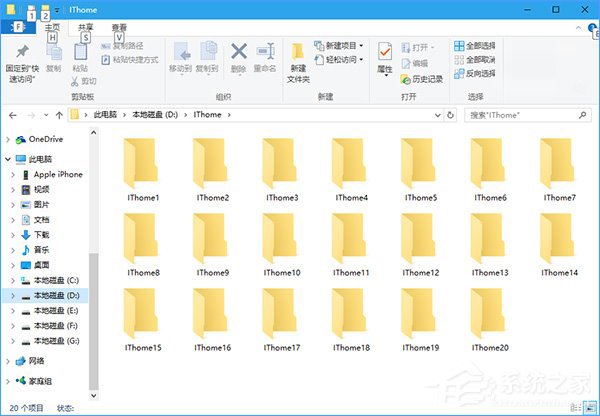
需大量建立編號資料夾時,PowerShell 一行指令搞定。開啟 PowerShell,切換目標目錄(或建完再移動),執行 mkdir $(1..10 | %{"IThome$_"}) 即生成 IThome1~IThome10 十個資料夾,數字與前綴皆可自訂。

指令解析

  • 1..10:編號範圍,可改如 11..20、1,5,10 等。
  • {"IThome$_"}:前綴字串,$_ 代表管線傳入的數字,可改任何文字。
實際操作

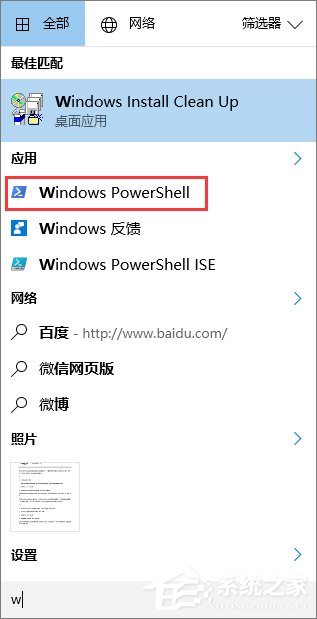
  1. 開始功能表開啟 Windows PowerShell。
    開啟 PowerShell
  2. 切換目錄(可略過,建完再移動)。
    切換目錄
  3. 執行批量建立指令。
    執行指令
  4. 生成結果。
    生成資料夾

提醒

複製指令到 PowerShell 時,某些版本可能顯示異常字元,請確認游標位置修正後再執行,避免報錯。

Copyright © Windows教程網 All Rights Reserved