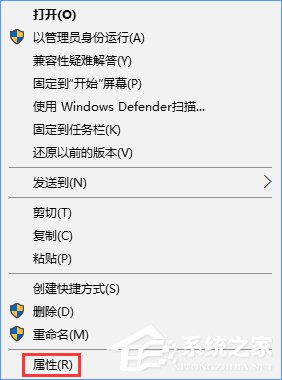
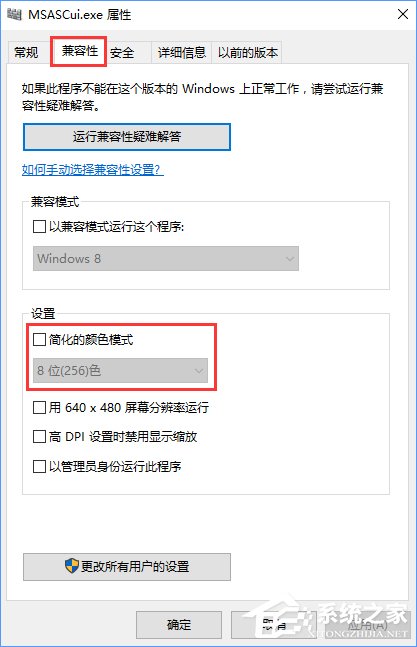
部分舊程式需在 256 色模式下執行。右鍵程式 → 內容 → 相容性 → 勾選 簡化色彩模式 → 下拉選 8 位元 (256 色) → 套用,即可強制該程式以 256 色運行。
Win10 系統音效檔案位置:C:\Windows\Media(.wav/.mid),可複製提取;禁用系統聲音:個人化→主題→進階聲音設定→聲音配置選「無聲」
Win10 預覽版 10061 鎖屏黑屏問題解決方案與修復補丁
Win10 自動更新失敗反覆報錯?四步驟清除快取徹底解決
Windows 8.1 裝置管理員完整使用教學
微軟反壟斷案新突破:專家呼籲 Win10 剝離可信計算模組
Win10 風扇狂轉異響?一鍵切換散熱模式靜音降溫
Windows 10 預覽版產品金鑰獲取官方管道教學
Windows 10「上帝模式」啟用與快捷方式建立完整教學