Windows XP Windows 7 Windows 2003 Windows Vista Windows 綜合教學 Linux 系統教學
Windows 10 Windows 8 Windows 2008 Windows NT Windows Server 電腦軟體教學

Win10 預覽版修改登錄導致無法更新修復:還原 SelfHost\Applicability 關鍵值解決 0x80246017 錯誤

編輯:Win10 系統應用技巧

早期用戶修改登錄嘗試獲取新版本,導致 Windows Update 請求不被允許的版本,報錯 0x80246017。Gabe Aul 提供修復登錄值:

  1. 開啟 regedit,展開:
    HKEY_LOCAL_MACHINE\SOFTWARE\Microsoft\WindowsSelfHost\Applicability
  2. BranchName → FBL_IMPRESSIVE
  3. ThresholdRiskLevel → low
  4. 刪除 ThresholdInternal 與 ThresholdOptedIn(若存在)。
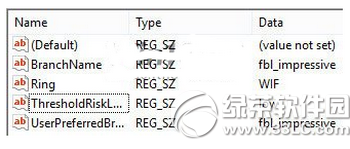
修改登錄導致更新錯誤

修復後登錄正確值

微軟仍在尋找通用完美解決方案,上述方法可解決多數用戶問題。

Copyright © Windows教程網 All Rights Reserved