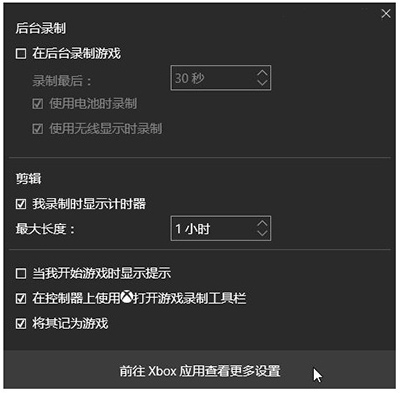
Win10 內建 Game Bar (遊戲列) 錄製功能,無需第三方軟體即可輕鬆錄製遊戲或應用程式畫面。
預設儲存於:C:\Users\<使用者名稱>\Videos\Captures\,格式為 MP4。
C:\Users\<使用者名稱>\Videos\Captures\
Game Bar 亦支援螢幕截圖 (Win + Alt + PrtScn)、麥克風語音錄製、廣播串流等功能,滿足大多數輕量錄製需求。
Win10 滑鼠右鍵選單出現在左側?平板電腦設定切換「慣用右手」恢復右側顯示
Win10 飛行模式功能解析:關閉 Wi-Fi/藍牙 ≠ 手機飛行模式,主要作用為省電與快速斷網
Windows 10 開始選單「登出」按鈕位置快速尋找指南
Windows 10 自訂個人化主題色彩:關閉自動提取色 + 登錄表修改 SpecialColor
Win10 磁碟清理按鈕不見了?啟用回收站功能即可恢復
Win10 對決 Win8:開始選單回歸、視窗化 Modern 應用、虛擬桌面、Continuum 雙模式、Cortana、通用應用、Xbox 串流、跨平台統一體驗
Win10 網路不穩定頻斷線?關閉定位服務可能改善
Windows 10 虛擬鍵盤新功能:文字預測與中文輸入優化