Windows 10 開始選單改版後,「登出」選項移至使用者頭像選單中,許多習慣 Windows 7 的用戶初次使用時找不到。
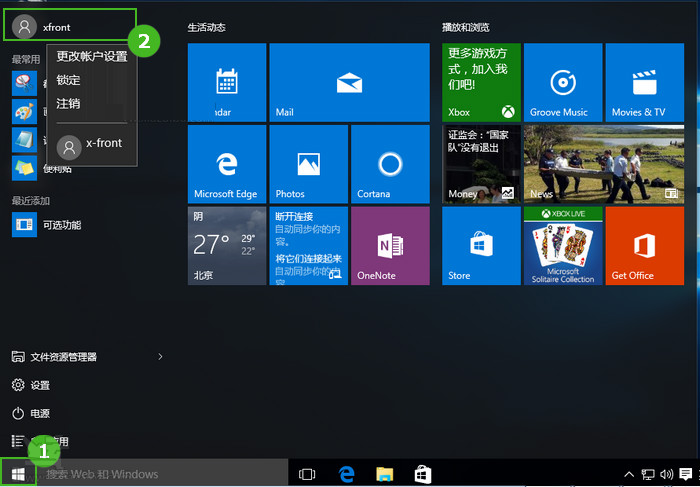
點擊使用者頭像 → 選單中即可找到「登出」
shutdown /lWindows 10 將電源選項(關機、重新開機、睡眠)獨立放在開始選單左下角電源圖示,而帳戶相關操作(登出、切換使用者、鎖定、變更帳戶設定)歸類在使用者頭像選單,符合現代 UI 設計邏輯。
Windows 10 新功能 OneGet:套件管理器統一命令列安裝體驗
Win10 HP 印表機驅動自動更新失敗 0x80240017 解決辦法
Win10 無法設定鎖定畫面壁紙?修復 SystemData 權限與登錄即可解決
Win10 左側導覽窗格出現兩個 USB 圖示?匯入 .reg 移除重複項目
Win10 滑鼠右鍵選單反應慢怎麼加速?登錄檔 ContextMenuHandlers 僅保留 New 項目刪除其餘第三方擴充
Windows 10 執行星海爭霸 (StarCraft) 畫面顯示不全解決方案:相容性設定停用高 DPI 縮放