Windows XP Windows 7 Windows 2003 Windows Vista Windows 綜合教學 Linux 系統教學
Windows 10 Windows 8 Windows 2008 Windows NT Windows Server 電腦軟體教學

Win10 開機卡在「正在掃描和修復磁碟機」?chkdsk 掃描修復 + 磁碟清理解決

編輯:Windows 10 系統介紹

開機每次出現「正在掃描和修復磁碟機 (C:)」導致啟動緩慢,主因是檔案系統髒位/邏輯錯誤。執行 chkdsk C: /f 主動掃描修復,或右鍵磁碟機 → 「內容」→「工具」→「檢查」,修復完成後執行磁碟清理移除暫存檔,開機不再卡住掃描畫面。

修復磁碟機錯誤

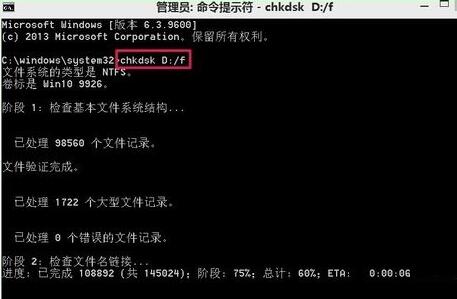
  1. Win+R → cmd (管理員) → 執行:
    chkdsk C: /f(C: 為提示錯誤的磁碟機代號)
    若提示鎖定失敗,輸入 Y 排程下次重開機執行。
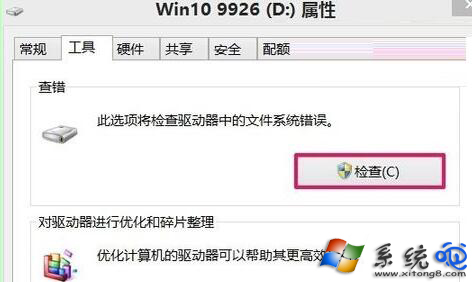
  2. 或圖形介面:右鍵磁碟機 → 「內容」→「工具」→「檢查」→ 「掃描並修復磁碟機」。
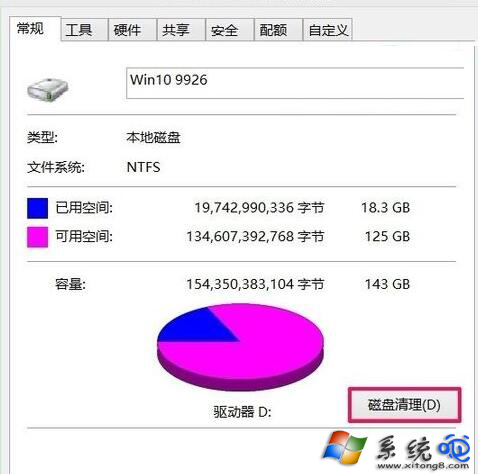
  3. 修復完成後,同介面「一般」分頁 → 「磁碟清理」→ 勾選暫存檔/回收站/縮圖快取等 → 確定刪除。

若頻繁出現,檢查:① 硬碟 S.M.A.R.T. 健康度(CrystalDiskInfo)② 關機習慣(避免強制斷電)③ 系統檔案完整性(sfc /scannow + DISM /RestoreHealth)。SSD 無需磁碟重組,勿在工具中對 SSD 執行「最佳化/重組」。


Copyright © Windows教程網 All Rights Reserved