Windows XP Windows 7 Windows 2003 Windows Vista Windows 綜合教學 Linux 系統教學
Windows 10 Windows 8 Windows 2008 Windows NT Windows Server 電腦軟體教學

Win10 桌布變模糊?關閉 JPEG 壓縮提升壁紙清晰度

編輯:Windows 10 系統介紹

高解析度圖片設為桌布卻變模糊,因 Windows 預設壓縮 JPEG 品質至 85%。在登錄新增 JPEGImportQuality 並設為 100 可禁用壓縮,恢復原圖清晰度。

修復步驟

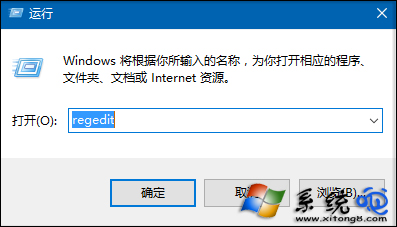
  1. 按 Win+R 輸入 regedit 開啟登錄編輯器。
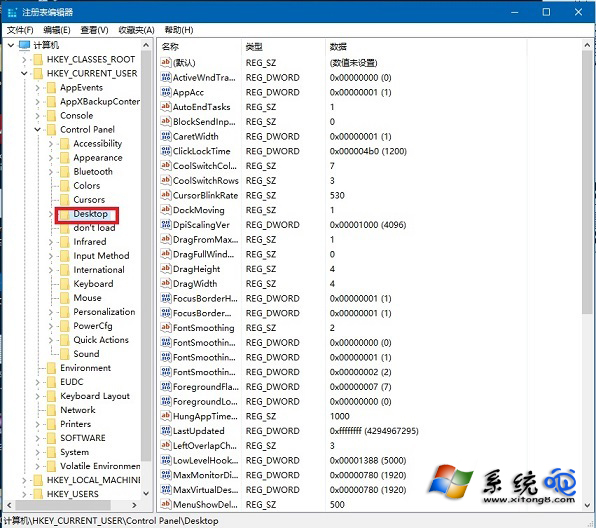
  2. 展開 HKEY_CURRENT_USER\Control Panel\Desktop。
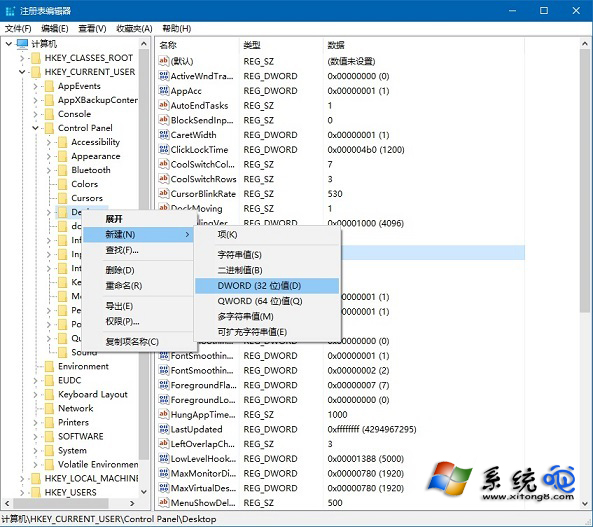
  3. 右鍵空白處 →「新增」→「DWORD (32 位元) 值」,命名 JPEGImportQuality。
  4. 雙擊修改數值資料為 100(十進位),確定。
  5. 重新開機生效。

執行 regedit

Desktop 路徑

新增 JPEGImportQuality
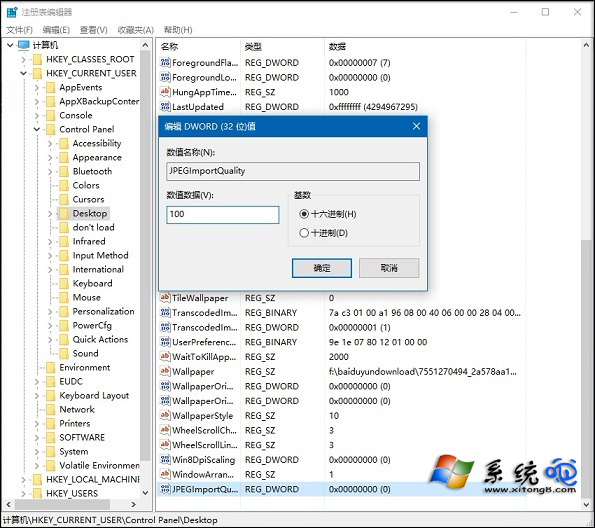
設定數值為 100

提醒:過大圖片(如超過 4K 解析度)設為桌布可能略微影響系統效能,建議依螢幕解析度選擇適當尺寸圖片。

Copyright © Windows教程網 All Rights Reserved