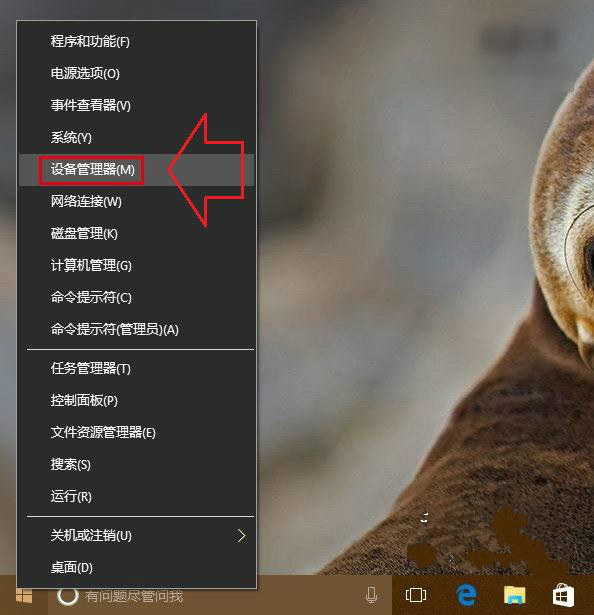
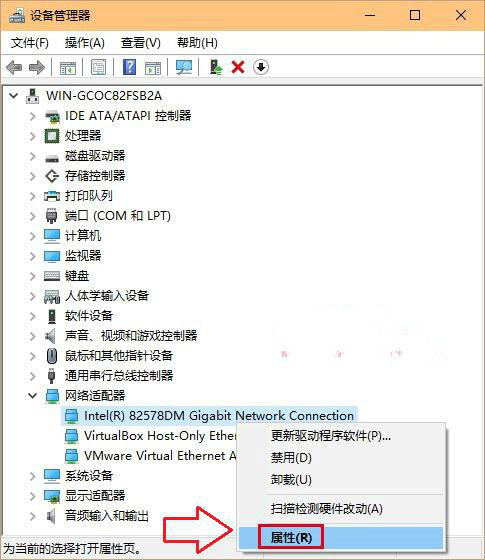
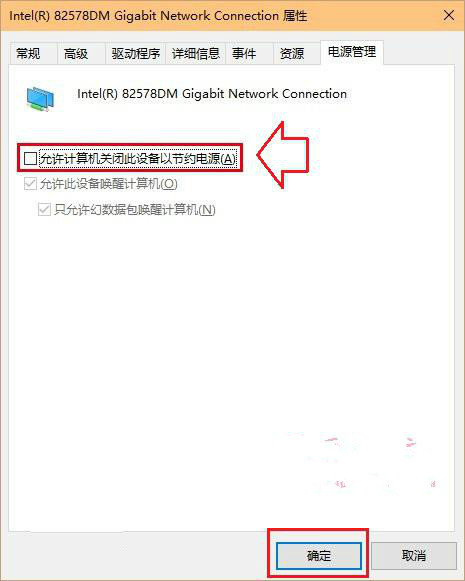
Win10 升級後網路不穩定、頻繁斷線,常因網卡驅動「允許電腦關閉此裝置以節省電源」導致。停用此選項可大幅改善。
補充建議:若無效,嘗試:① 更新網卡驅動至廠商官網最新版 ② 使用 Windows「疑難排解」→「網路介面卡」 ③ 使用 360 斷網急救箱修復。排除路由器、ISP 故障後再操作。
Win10 新版 Edge 瀏覽器完整使用手冊
Win10 網路頻繁斷線?關閉網卡「允許電腦關閉此裝置以節省電源」徹底解決
升級 Win10 後電腦自動開機怎麼辦?關閉自動維護喚醒功能解決
Windows 10 Build 10074 開始選單無法開啟解決方案:安裝英文 (美國) 語言包 KB3061055 (重複內容,獨立發布版)
Win10 開始選單彈出緩慢?三大優化:關閉亞克力、動畫、Cortana 網路搜尋
Win10 正式版深度體驗評測:開始選單回歸、虛擬桌面、小娜語音助理全面解析
Win10 滑鼠右鍵失靈無反應?透過登錄檔修復 NoViewContextMenu 與重啟總管
Windows 10 滑鼠喚出 Charms 列:PopCharms 小工具讓右側邊緣手勢回歸