Windows XP Windows 7 Windows 2003 Windows Vista Windows 綜合教學 Linux 系統教學
Windows 10 Windows 8 Windows 2008 Windows NT Windows Server 電腦軟體教學

Win10 應用程式商店閃退/無法開啟怎麼修?CMD 執行 wsreset 重置商店快取修復

編輯:Windows 10 系統介紹

Windows 10 應用程式商店 (Microsoft Store) 若出現閃退、打不開、下載卡住等問題,多數源於本地快取損壞。以系統管理員身分執行 wsreset.exe 或刪除特定 JSON 快取檔,可快速重置商店狀態。

修復步驟

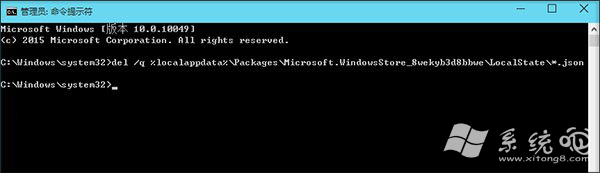
  1. 按 Win + X → 「命令提示字元 (系統管理員)」或「Windows PowerShell (系統管理員)」。
  2. 輸入以下指令並按 Enter:
    del /q %localappdata%\Packages\Microsoft.WindowsStore_8wekyb3d8bbwe\LocalState\*.json
  3. 或直接執行內建重置工具:
    wsreset.exe
  4. 等待指令執行完成,商店將自動啟動並重新載入。

前提條件:商店應用程式本體未被移除 (若已移除需從安裝媒體或 PowerShell 重新佈建)。大多數商店異常均可透過上述方式解決。

Copyright © Windows教程網 All Rights Reserved