Windows XP Windows 7 Windows 2003 Windows Vista Windows 綜合教學 Linux 系統教學
Windows 10 Windows 8 Windows 2008 Windows NT Windows Server 電腦軟體教學

Win10 開機啟動項怎麼刪除冗餘項?軟媒魔方/Autoruns/登錄檔三法任選

編輯:Windows 10 系統介紹

任務管理員只能啟用/停用啟動項,無法徹底刪除殘留項。三種刪除冗餘啟動項工具:① 軟媒魔方 圖形化介面一鍵刪除;② 微軟官方 Autoruns 黃底標記殘留項右鍵 Delete;③ 登錄檔 Run、RunOnce 鍵值手動刪除。建議優先用 Autoruns 專業、免安裝。
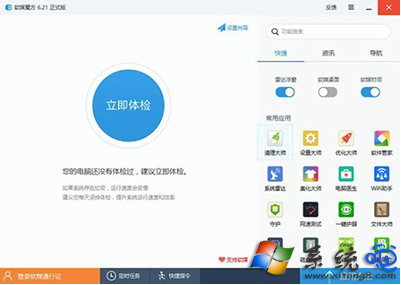
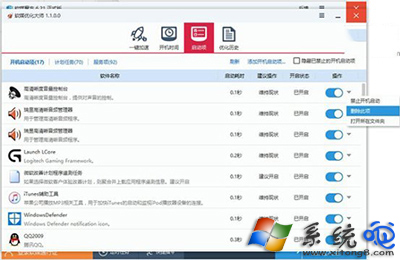
方法一:軟媒魔方(圖形化易上手)

  1. 開啟軟媒魔方 → 「優化大師」→「啟動項」。
  2. 右鍵目標項 → 倒三角選單 → 「刪除此項」。

方法二:Autoruns(官方專業工具)

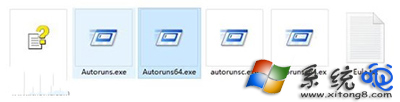
  1. 下載 Autoruns.zip(Sysinternals 官網) → 解壓 → 依系統位元執行 Autoruns64.exe 或 Autoruns.exe。
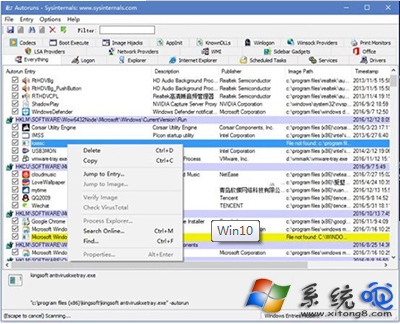
  2. 2. 黃底標記項 = 檔案遺失的殘留啟動項,右鍵 → 「Delete」。
  3. 正常軟體啟動項亦可右鍵 Delete 移除(下次該軟體可能自動重建)。

方法三:登錄檔手動刪除

  1. Win+R → regedit。
  2. 兩個主要位置:
    HKEY_CURRENT_USER\Software\Microsoft\Windows\CurrentVersion\Run
    HKEY_LOCAL_MACHINE\SOFTWARE\Microsoft\Windows\CurrentVersion\Run
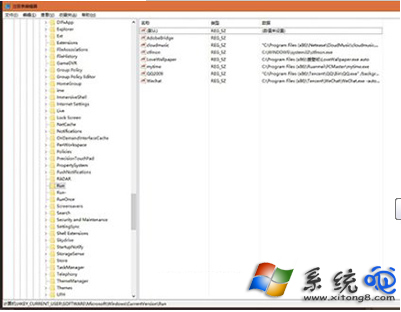
  3. 右側右鍵目標值 → 「刪除」。

登錄檔快速切換技巧:在頂部路徑列直接修改 HKEY_CURRENT_USER ↔ HKEY_LOCAL_MACHINE 並按 Enter 跳轉。刪除前建議匯出該分支備份(右鍵 → 「匯出」)。

Copyright © Windows教程網 All Rights Reserved