Win10 開啟下載檔案時彈出「開啟檔案 - 安全性警告」,頻繁干擾操作。可透過停用「Security Center」服務來關閉此提示。
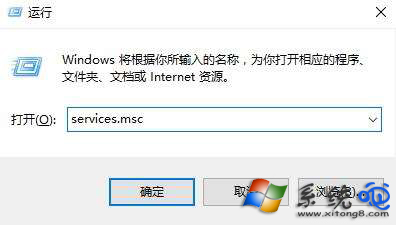
services.msc
執行 services.msc
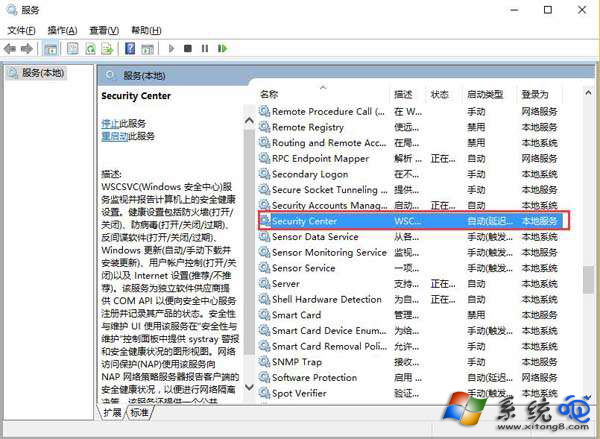
Security Center 服務
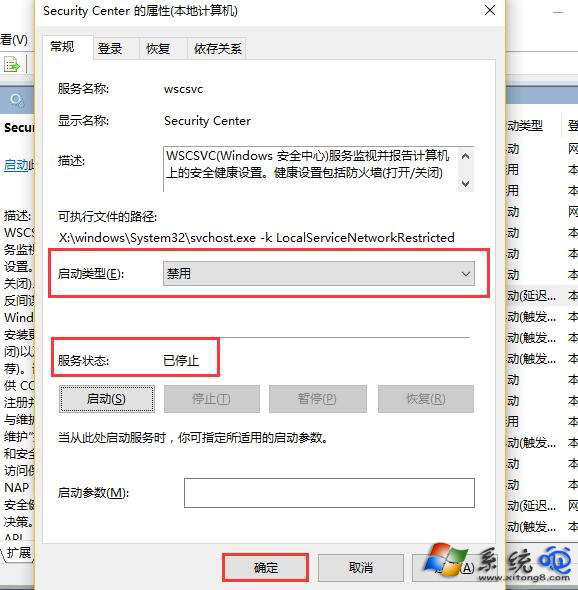
設為停用
注意:停用安全中心將不再接收 Windows Defender 等安全通知,建議僅在確信來源安全的環境下使用,或改用「解除封鎖」單一檔案方式(右鍵檔案 → 內容 → 勾選「解除封鎖」)。
Windows 10 變更使用者頭像為自訂圖片
Windows 10 Build 9901 Modern 設計語言變革:白色線條圖示取代灰色填色、標題列按鈕簡化
Win10 Mobile RS2 14926 升級錯誤 0x800703ed 解決方案:移除 SD 卡重試安裝,官方承認無 100% 解法正在處理
Win10 音量圖示灰色無法開啟?重新啟動檔案總管即可解決
Win10 Build 10240.17071 (RTM) 累積更新內容完整彙整
Windows 10 預覽版更改預設輸入法完整教學:新增輸入法至設為預設 9 步驟圖解
Win10 設定 IE 瀏覽器檔案關聯:修復無法開啟 HTML 等網頁檔案
Windows 10 Windows Defender 無法啟動?一鍵指令修復服務