Windows XP Windows 7 Windows 2003 Windows Vista Windows 綜合教學 Linux 系統教學
Windows 10 Windows 8 Windows 2008 Windows NT Windows Server 電腦軟體教學

Win10 更新失敗錯誤 80240016?重啟 Windows Update 服務即可解決

編輯:Windows 10 系統介紹

Windows 10 更新時出現錯誤代碼 80240016,代表「Windows Update 無法存取使用者權杖」,通常是 wuauserv (Windows Update) 服務 狀態異常導致。透過命令提示字元重新啟動該服務,即可快速恢復更新功能。

修復步驟

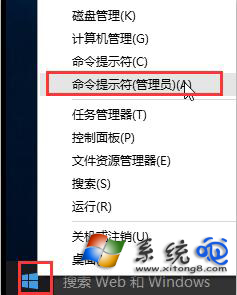
  1. 右鍵「開始」按鈕 →「命令提示字元 (系統管理員)」或「Windows PowerShell (系統管理員)」。
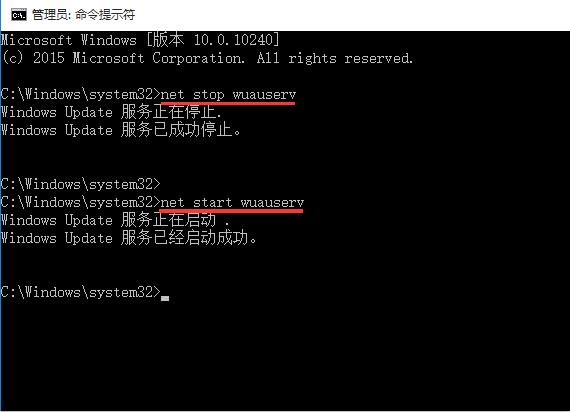
  2. 依序輸入以下指令,每行按 Enter:
net stop wuauserv
net start wuauserv

管理員命令提示字元

停止並啟動 wuauserv

  1. 確認顯示「服務已成功停止」與「服務已成功啟動」。
  2. 前往「設定 → 更新與安全性 → Windows Update」重新檢查更新。

若仍無法更新

  • 執行 sfc /scannow 修復系統檔案。
  • 刪除 C:\Windows\SoftwareDistribution\Download 內容(更新快取),再重試。
  • 執行 DISM /Online /Cleanup-Image /RestoreHealth 修復元件存放區。
  • 使用「Windows Update 疑難排解」工具 (設定 → 更新與安全性 → 疑難排解)。

相關服務檢查

確認以下服務均為「自動」且「執行中」:

  • Background Intelligent Transfer Service (BITS)
  • Cryptographic Services
  • Windows Update (wuauserv)
Copyright © Windows教程網 All Rights Reserved