Windows XP Windows 7 Windows 2003 Windows Vista Windows 綜合教學 Linux 系統教學
Windows 10 Windows 8 Windows 2008 Windows NT Windows Server 電腦軟體教學

Win10 找不到 IE 瀏覽器?搜尋「IE」或 Edge 選單「使用 Internet Explorer 開啟」喚出

編輯:Windows 10 系統介紹

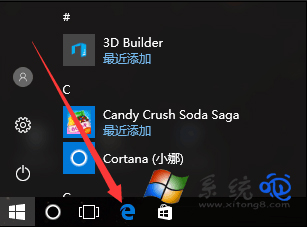
Win10 桌面/工作列預設無 IE 圖示。喚出法:1. 右鍵「開始」 → 「搜尋」 → 輸入 IE → 點擊「Internet Explorer」。2. 開啟 Edge → 右上角「...」 → 「更多工具」 → 「使用 Internet Explorer 開啟」。常用建議:搜尋出 IE 後右鍵「釘選到工作列」或「開啟檔案位置」→ 右鍵 iexplore.exe → 「傳送到→桌面建立捷徑」。
喚出與固定

  1. 右鍵開始 → 搜尋 → 輸入 IE → 開啟 Internet Explorer。
  2. 或 Edge → ... → 更多工具 → 使用 Internet Explorer 開啟。
  3. 右鍵 IE 工作列圖示 → 「釘選到工作列」常駐。
  4. 或 IE 內容 → 「開啟檔案位置」 → 右鍵 iexplore.exe → 傳送到桌面建立捷徑。

搜尋 IE 瀏覽器

說明:IE 仍內建於 Win10(支援舊版 ActiveX/相容性檢視),但 Microsoft 已停止功能更新,建議僅作為特定舊系統相容用途。

Copyright © Windows教程網 All Rights Reserved