升級 Win10 後殘留的 windows.old 佔用大量空間,常因權限問題無法直接刪除。兩種簡單清理法:
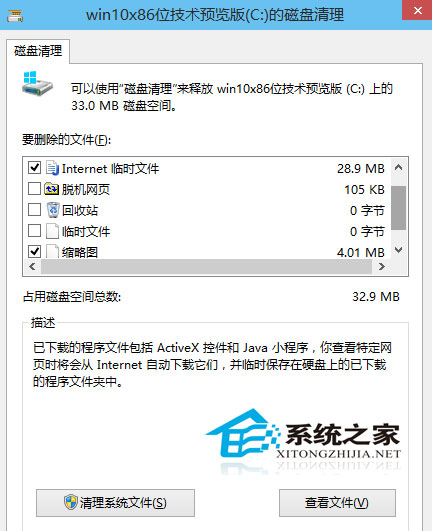
方法一:系統內建磁碟清理(推薦)
方法二:第三方工具強制刪除
使用 360 清理大師等工具,將 windows.old 拖入強制刪除區執行。
兩法皆有效,內建工具更安全無毒,習慣第三方工具者可採方法二。
Windows XP 升級 Win10 方法:微軟稱需 ISO 乾淨安裝,配置需求低舊電腦也能跑
Win10 開啟應用程式報錯 0xc0000018?登錄表清除 APPINIT_DLLS 數值修復
Win10 升級後開機出現 Recovery 藍畫面怎麼辦?重新安裝最新版本為最佳解方
Win 10 執行《魔獸世界》卡頓、掉幀、當機?移除 Xbox App 與停用內建輸入法
Win10 資料夾「正在使用無法刪除」解決方案:使用電腦管家檔案粉碎功能
Windows 10 C 槽清理 6 大實用技巧:騰出寶貴 SSD 空間
Win7/Win8.1 升級 Win10 後重新安裝系統完整指南:確認啟用狀態、使用正確 ISO、備份資料、跳過金鑰、聯網自動啟用