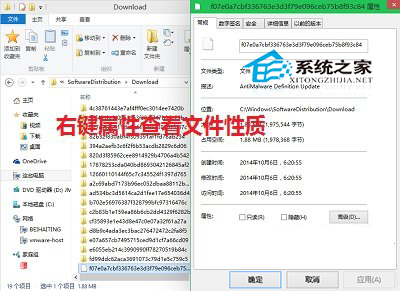
Microsoft Store 下載的應用程式安裝檔、更新檔預設儲存在 C:\Windows\SoftwareDistribution\Download,長期累積佔據大量 C 槽空間。以下教你定位並安全清理:
C:\Windows\SoftwareDistribution\Download
SoftwareDistribution
Download
Win10 如何關閉鎖定畫面直接顯示登入介面?群組原則或登錄表兩種方法
Win10 開機彈出 rsdefense.exe 應用程式錯誤?登錄清理徹底根除殘留啟動項
Win10 Mobile 10581 更新下載卡 0% 解決辦法
Win10 如何批次重新命名檔案?選取多檔 → 右鍵「重新命名」自動編號
Windows 10 解決支付寶控件不支援:群組原則修改 User-Agent 模擬 IE8 相容模式
Win10 通知區域圖示自訂設定開啟方法:指令與捷徑兩種途徑
Win10 Build 9926 應用程式商店新 UI 搶先看:灰色調主題、垂直捲軸、全螢幕集合頁面
Win10 無限重開機循環問題解決:USB 修復媒體修復啟動與檔案系統