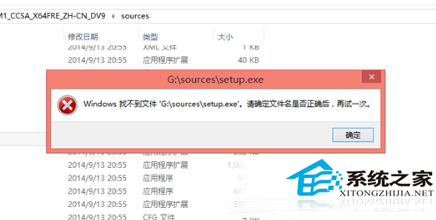
在 32 位元 Win10 系統下雙擊 64 位元 ISO 內的 setup.exe,會報錯「Windows 找不到檔案 'G:\sources\setup.exe'」。根本原因:32 位元作業系統無法執行 64 位元安裝程式。
setup.exe
32 位元系統無法原地升級為 64 位元,必須透過可開機媒體重新安裝。普通用戶 32 位元足夠,大型運算、超過 4GB 記憶體機器建議 64 位元。
Win10 磁碟檢查結果在哪看?事件檢視器查詢 CHKDSK 日誌完整教學
Windows 10 退出家用群組並關閉家用群組功能
Win10 任務列語言欄佔空間?教你快速隱藏騰出更多區域
Win10 清理 QQ 快取檔案步驟教學
Win10 如何修改/刪除網路名稱?登錄編輯器直接操作網路設定檔
Win10 開啟隱藏的登入介面測試鉤子(Threshold 鍵值)
Windows 10 系統還原完整教學:將電腦恢復到正常狀態
Win10 為電腦新增描述:區域網路快速識別裝置用途