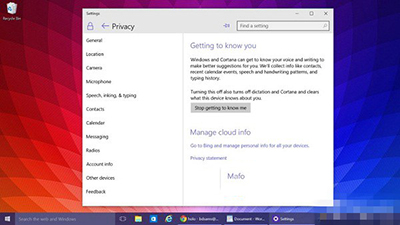
Win10 預覽版更新後,小娜助手會監測使用者操作行為。擔心隱私者可透過設定停用。
停用小娜助手設定畫面
Build 10074 已內建此開關,正式版亦將沿用此方式。操作簡單,有效保護隱私。
Win10 更新出現錯誤 0x80240016 (80240016)?重置 Wuauserv 服務與使用者權杖機制深度解析
Win10 查看歷史問題報告與解決方案:指令啟動 werconcpl.dll 與控制台「安全性與維護」雙軌查詢
Win10 控制台在哪?兩條最快路徑直達
Windows 10 找回消失的開始選單設定方法
Win10 開始菜單/任務欄/標題欄強調色自定義教程:濃度滑桿微調視覺風格
Win10 快速切換至桌面的兩大絕招:任務列按鈕與 Win+D 快捷鍵
Win10 小娜 (Cortana) 只顯示文字無語音?設定喇叭為預設播放裝置修復
Win10 安裝 CAJViewer 文獻閱讀器完整圖文教學:下載→執行→授權協議→安裝路徑→完整安裝