Windows XP Windows 7 Windows 2003 Windows Vista Windows 綜合教學 Linux 系統教學
Windows 10 Windows 8 Windows 2008 Windows NT Windows Server 電腦軟體教學

Windows 10 桌面新增 IE 瀏覽器圖示教學:註冊表檔案一鍵匯入

編輯:Windows 10 系統介紹

Windows 10 桌面預設不顯示 IE 圖示,可透過註冊表檔快速建立:

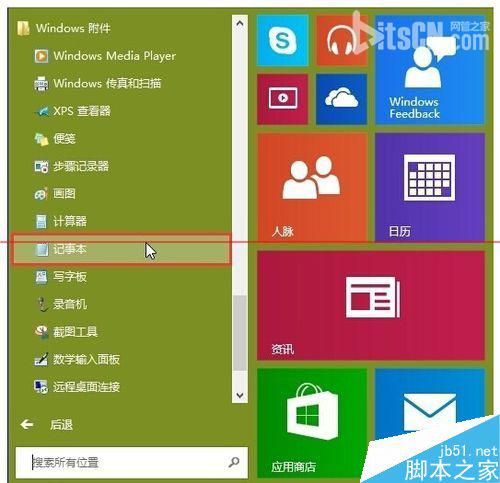
  1. 開啟「記事本」 (開始 → Windows 附件 → 記事本)。
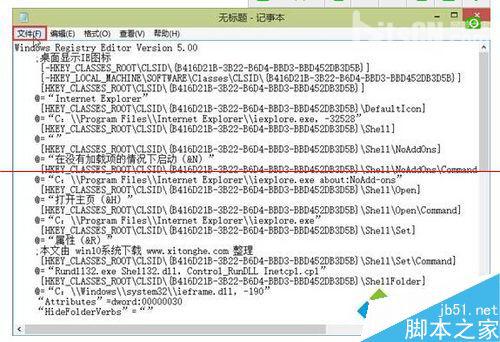
  2. 貼上以下註冊表內容:
Windows Registry Editor Version 5.00

[HKEY_CURRENT_USER\Software\Microsoft\Internet Explorer\Main]
"DesktopIcon"=dword:00000001
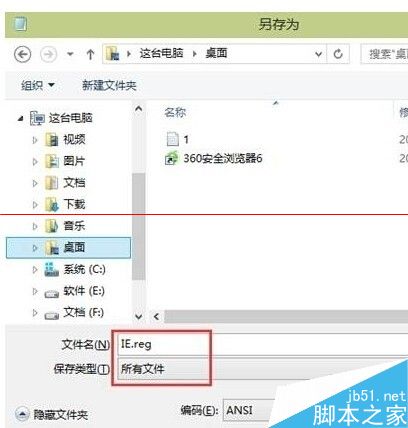
  1. 另存為:檔名 IE.reg,類型選「所有檔案」 → 儲存至桌面。
  2. 雙擊 IE.reg → 「是」確認匯入 → 「確定」。

桌面即會出現 IE 圖示,雙擊即可啟動 Internet Explorer。
Copyright © Windows教程網 All Rights Reserved