Windows XP Windows 7 Windows 2003 Windows Vista Windows 綜合教學 Linux 系統教學
Windows 10 Windows 8 Windows 2008 Windows NT Windows Server 電腦軟體教學

Windows 10 PowerShell 批量移除所有 Modern 應用磚 (含系統內建)

編輯:Windows 10 系統介紹

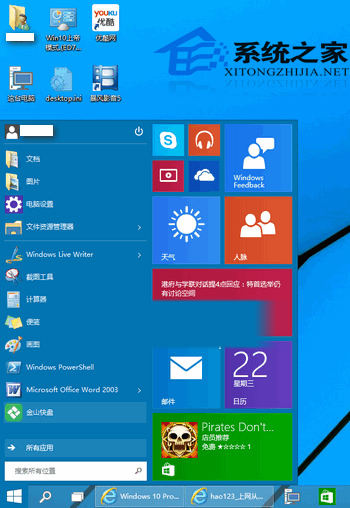
Windows 10 開始功能表右側磚區預設塞滿 Modern 應用 (UWP)。若習慣傳統開始功能表,可透過 PowerShell 一鍵移除所有當前使用者/所有使用者的 UWP 應用,徹底淨化開始功能表(而非僅「取消釘選」隱藏)。

操作步驟

  1. 開始功能表搜尋「PowerShell」→ 右鍵「以系統管理員身分執行」。
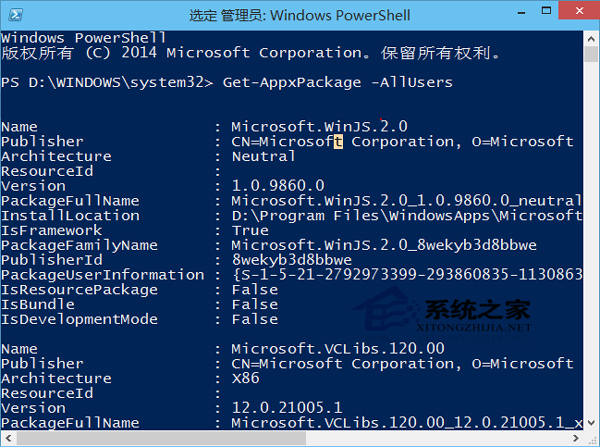
  2. 在視窗輸入以下指令並按 Enter:
Get-AppxPackage -AllUsers | Remove-AppxPackage
  1. 等待指令跑完(可能需數分鐘),完成後重新登入或重啟 explorer.exe,磚區將完全空白。

開始功能表磚區預設狀態

PowerShell 管理員執行指令

重要提醒:

  • 此指令會移除所有 UWP 應用,包含計算機、照片、設定、Microsoft Store 等系統內建工具。
  • 若誤移除需用應用,可在 PowerShell 執行 Get-AppxPackage -AllUsers *名稱* | Foreach {Add-AppxPackage -DisableDevelopmentMode -Register "$($_.InstallLocation)\AppXManifest.xml"} 重新註冊,或從 Store 重裝。

  • 僅想隱藏磚而保留應用,請改用右鍵「取消釘選」或設定 → 個人化 → 開始 → 關閉「顯示應用程式清單」。
Copyright © Windows教程網 All Rights Reserved