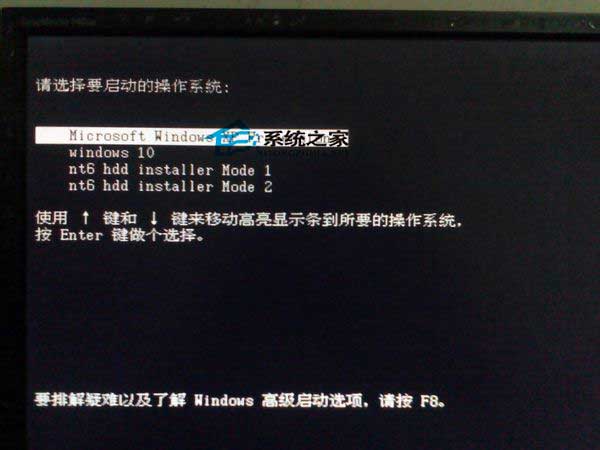
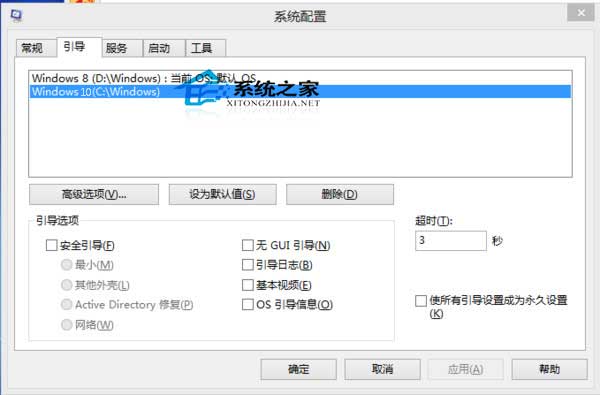
安裝 Windows 10 失敗或移除後,開機選單可能殘留「Windows 10」選項。透過系統設定工具 msconfig 可輕鬆移除多餘開機項目。
msconfig
建議:嘗試 Windows 10 預覽版時,優先使用虛擬機 (Hyper-V、VMware、VirtualBox) 安裝,避免污染實體機開機設定。若必須實體安裝,建議備份 BCD (bcdedit /export backup.bcd) 以便快速還原。
bcdedit /export backup.bcd
Win10 開始選單無法開啟?重新啟動檔案總管 3 秒修復
Windows 10 Build 9880 預覽版資訊:Flight Level Low、winmain 分支、窗口動畫改進
Win10 啟動「語音辨識」兩大入口:開始選單與搜尋框雙管齊下
Win10 個人化設定無法開啟?內建管理員帳戶 UAC 導致,啟用 Admin Approval Mode 修復
Windows 10 安裝到 USB 隨身碟 (Windows To Go) 完整教學:WinToGo 工具實作
Win10 家用版/專業版升級企業版:輸入產品金鑰線上升級完整圖解
Win10 Build 14393.51 累積更新修復內容:IE11 可靠性、手寫筆設定、藍牙掛起、安全性更新
Win10 執行遊戲跳出 0xc0000022 錯誤?啟用 DirectPlay 元件修復