Windows XP Windows 7 Windows 2003 Windows Vista Windows 綜合教學 Linux 系統教學
Windows 10 Windows 8 Windows 2008 Windows NT Windows Server 電腦軟體教學

Win10 檔案總管「常用資料夾」恢復初始狀態一條指令搞定

編輯:Windows 10 系統介紹

Windows 10 檔案總管「常用資料夾」 (Quick Access) 會自動記錄常用路徑,久而久之列表冗長且洩露隱私。透過一條命令提示字元指令即可清除所有自動記錄,恢復安裝初始狀態。

操作步驟

  1. 關閉所有開啟的檔案總管視窗。
  2. 以系統管理員身分開啟命令提示字元 (搜尋 `cmd` → 右鍵 [以系統管理員身分執行])。
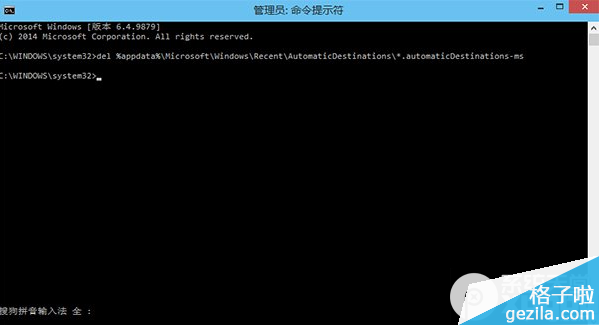
  3. 輸入指令並按 Enter:
del %appdata%\Microsoft\Windows\Recent\AutomaticDestinations\*.automaticDestinations-ms
  1. 重新啟動檔案總管 (可用工作管理員重啟 `explorer.exe`,或使用軟媒魔方等工具)。
  2. 重新開啟檔案總管,「常用資料夾」已恢復初始空白狀態。

CMD 執行清除指令

原理說明

`.automaticDestinations-ms` 檔案儲存自動追蹤的常用路徑資料。刪除此資料夾下所有該類型檔案即可重置。手動釘選的資料夾不受影響。

Copyright © Windows教程網 All Rights Reserved