Windows 10 應用程式商店(Microsoft Store)預設為視窗模式,切換全螢幕方法如下:

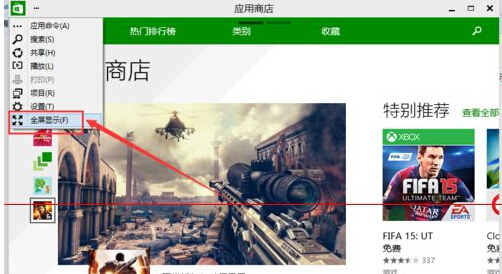
說明:最大化按鈕(方框圖示)僅放大視窗至螢幕大小,仍保留標題列與工作列;「全螢幕顯示」則隱藏所有系統 UI,提供沉浸式瀏覽體驗。再次點擊「...」選「結束全螢幕」或按 Esc 可返回視窗模式。
Win10 安裝 CentOS 7 雙系統完整圖文教學 (UEFI + GPT 適用)
Win10 右鍵「新增」無反應、消失?修復登錄表 New 鍵值恢復功能 (同 ID 23159)
Windows 10 使用必知五大觀念:升級風險、相容性、設定分散、DVD 移除、顯卡驅動問題
Win10 更換 Windows 照片檢視器背景顏色:登錄檔自訂十六進位色碼
Windows 10 在「主頁」資料夾加入「程式庫」:登錄新增兩個 DelegateFolders 子鍵 {031E4825-7B94-4dc3-B131-E946B44C8DD5}