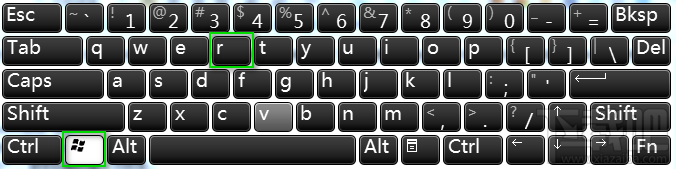
「執行」 (Run) 視窗是快速啟動系統工具、開啟資料夾、執行指令的經典入口。Windows 10 提供鍵盤快捷鍵與搜尋列兩種開啟方式。


| 指令 | 功能 |
|---|---|
cmd | 命令提示字元 |
powershell | PowerShell |
regedit | 登錄編輯器 |
gpedit.msc | 群組原則編輯器 (專業版+) |
services.msc | 服務管理 |
ncpa.cpl | 網路連線 |
appwiz.cpl | 程式和功能 |
control | 控制台 |
msconfig | 系統設定 |
diskmgmt.msc | 磁碟管理 |
善用 Win+R + 指令,系統管理效率倍增。
Windows 10 移除內建 Windows Media Player 播放器教學
Win10 桌面右鍵選單一鍵切換電源計劃:匯入 .reg 註冊表,平衡/高效能/省電秒切
Win10 重置後出現 INACCESSIBLE_BOOT_DEVICE 藍屏?安全模式停用/更新顯卡驅動即可修復
Win10 開機藍屏 0x0000006B 怎麼辦?清理啟動項與服務、重設商店快取完整修復
Win10 LOL 伺服器連線異常完整排查:防火牆、LSP、TGP 三階段修復
Win10 9879 OneNote/Mail/Reader 應用更新失敗?PowerShell 移除重裝三步曲修復