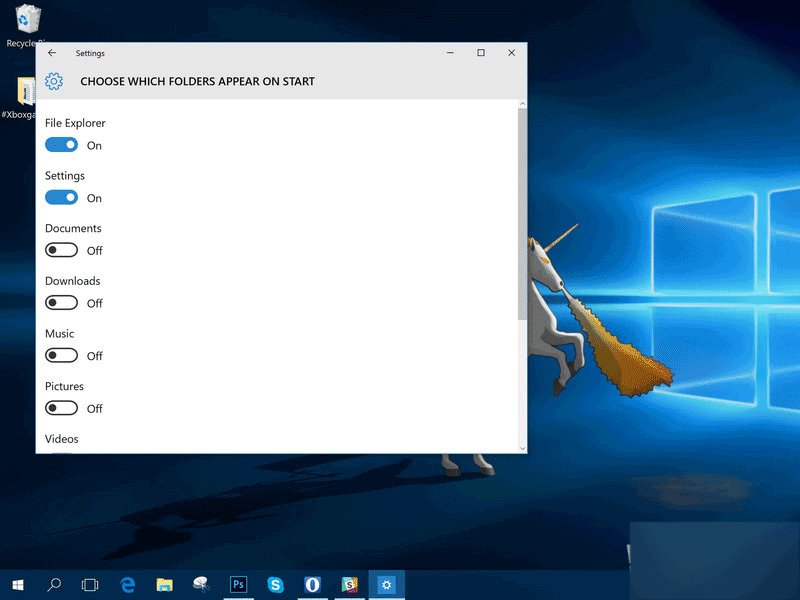
想在開始菜單左側固定常用資料夾(如文件、下載、網路)?不需複雜操作,直接在設定中勾選:
也可在小娜搜尋列輸入「開始設定」直接跳轉至步驟 3。調整後開始菜單左側即會出現/消失對應捷徑。
Win10 系統還原/一鍵還原教學:控制台→復原→系統還原,選擇還原點回溯 (含官方下載連結提醒)
Windows 10 使用掃描儀完整教學:從控制台啟動到儲存圖片一步到位
Windows 10 將回收站釘選到任務列的方法
Win10 開機加速:啟用「快速啟動」讓開機提速 30-50%
Win10 安裝無法建立新分區解決:用 PE 工具轉為主分區
Windows 10 9926 新版 F12 開發人員工具五大改進:UI、除錯、主控台、UI 回應、網路工具
Win10 全螢幕遊戲切換藍屏 driver_power_state_failure 解決:關閉休眠與混合睡眠
Win10 如何關閉小娜 (Cortana)?群組原理與登錄檔雙管齊下完全禁用