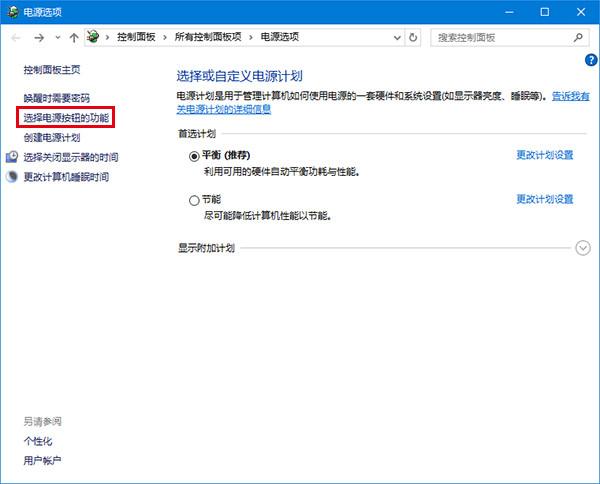
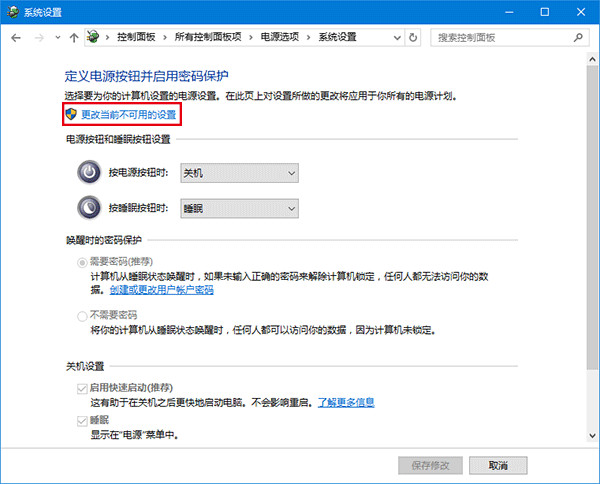
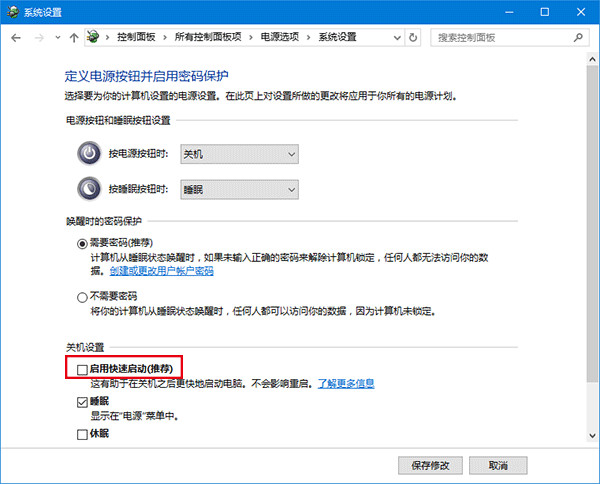
原因:快速啟動與驅動程式相容性衝突。解法:電源選項 → 選擇電源按鈕功能 → 變更無法使用的設定 → 取消勾選「啟用快速啟動」→ 儲存變更。
權衡:關閉後開機稍慢,睡眠/待機恢復正常。建議更新驅動後嘗試重新啟用。
Windows 10 開機出現 Recovery 藍畫面 (0xc000000f) 修復:重新安裝系統為唯一解
Win10 查看藍畫面記憶體傾印檔:三種類型、儲存路徑、搜尋技巧全解析
Win 10 無法複製檔案到 USB 隨身碟?登錄檔新增 WriteProtect=0 解除寫入保護
Win10 開始功能表打不開?兩種修復方案 (含產品金鑰法)
Win10 ISO 鏡像文件如何打開?Daemon Tools Lite 掛載教程
Win10 升級錯誤 0xc0000017「記憶體不足」?BCD 清除壞記憶體標記解決
Win10 桌面捷徑「目標」欄位灰色無法編輯?重建真實捷徑即可修復
Win10 如何變更 DNS 伺服器位址(附常用公共 DNS 列表)