不想讓瀏覽器記住歷史紀錄?IE 11 提供手動清除功能,可自訂保留/刪除項目:
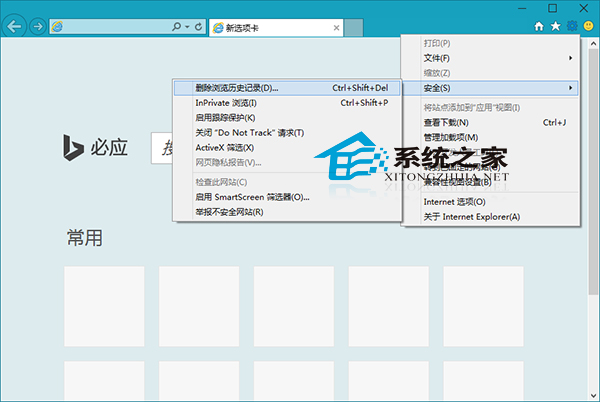
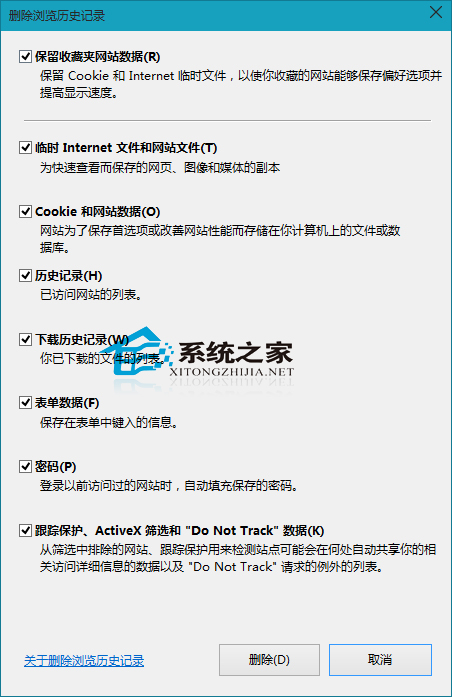
掌握此法,借用他人電腦或公用電腦後可徹底清除隱私痕跡。
Win10 控制台打不開?系統 .cpl 檔案修復與關聯註冊表完整修復指南
Windows 10 預覽版 9860 升級教學:透過「預覽版本」立即檢查更新
Win10 如何顯示隱藏檔案?資料夾「檢視」頁籤一鍵勾選「隱藏項目」
Win10 安裝新版 Office 無法開啟應用程式?批次檔重設授權快取重裝解決
Win10 關機三大法:開始選單、Alt+F4、右鍵開始按鈕
Win10 佔用空間大怎麼辦?五大瘦身招:關閉家庭群組、關閉自動維護、關閉虛擬記憶體(大記憶體機)、關閉 IPv6、關閉 Windows Defender