Windows XP Windows 7 Windows 2003 Windows Vista Windows 綜合教學 Linux 系統教學
Windows 10 Windows 8 Windows 2008 Windows NT Windows Server 電腦軟體教學

Win10 修改/刪除網路名稱:註冊表 Profiles 鍵值操作完整教學

編輯:Windows 10 系統介紹

Win10 移除了「網路和共用中心」的圖示編輯功能,若想自訂網路名稱或清除殘留的「網路 2」、「網路 3」,需透過註冊表 NetworkList\Profiles 鍵值操作。
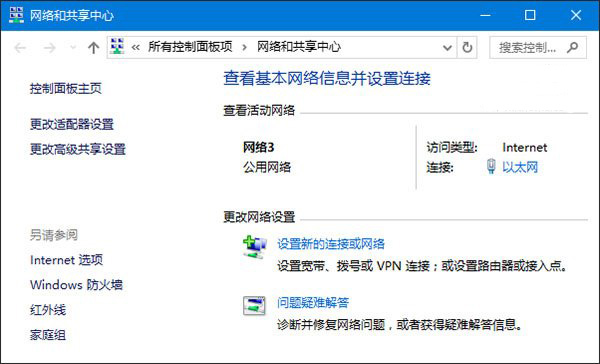
操作步驟

  1. Win+R → regedit。
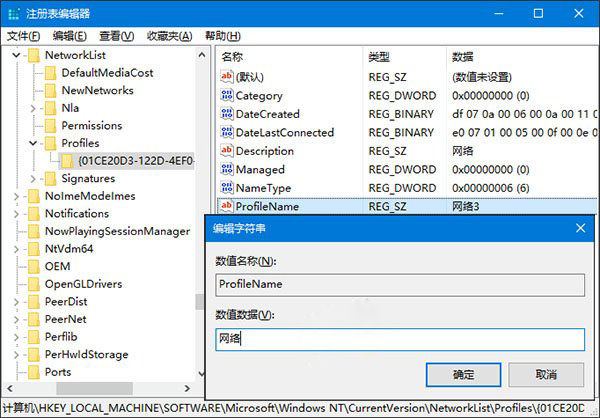
  2. 瀏覽至:
    HKEY_LOCAL_MACHINE\SOFTWARE\Microsoft\Windows NT\CurrentVersion\NetworkList\Profiles
  3. 每個子項代表一個網路設定檔。點選子項,右側 ProfileName 即為顯示名稱。

  • 修改名稱:雙擊 ProfileName,輸入新名稱。
  • 刪除網路:右鍵對應子項 → 「刪除」(依 ProfileName 確認身份)。

重新開機或重新連線後生效。此為 Win10 管理網路名稱的標準方法。

Copyright © Windows教程網 All Rights Reserved