Windows XP Windows 7 Windows 2003 Windows Vista Windows 綜合教學 Linux 系統教學
Windows 10 Windows 8 Windows 2008 Windows NT Windows Server 電腦軟體教學

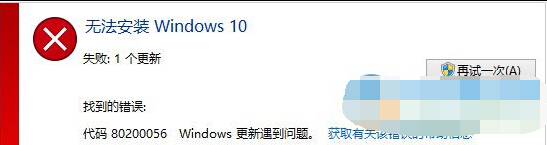
Win10 更新錯誤 0x80200056?三大解決方案完整攻略

編輯:Windows 10 系統介紹

Win10 更新卡住並報錯 0x80200056,通常是 Windows Update 服務異常、快取損毀或系統檔案錯誤導致。提供三種由輕到重的解決方案。
方案一:確認關鍵服務啟用

  1. Win+R → services.msc。
  2. 確認下列服務「啟動類型」為「自動」或「手動」且狀態為「執行中」:
    Windows Update、Background Intelligent Transfer Service、Cryptographic Services、Windows Installer、Software Licensing Service。

方案二:重命名 SoftwareDistribution 快取資料夾

  1. services.msc 停用「Windows Update」服務,啟動類型改「停用」。
  2. 將 C:\Windows\SoftwareDistribution 重命名為 SDfolder(或 SoftwareDistribution.old)。
  3. 重新啟用 Windows Update 服務,再次檢查更新。

方案三:不保留檔案重新安裝(最後手段)

備份重要資料後,選擇「不保留任何項目」重新安裝 Win10。

建議依序嘗試方案一、二,多數情況即可解決。若仍失敗,請提供錯誤代碼至論壇尋求協助。

Copyright © Windows教程網 All Rights Reserved