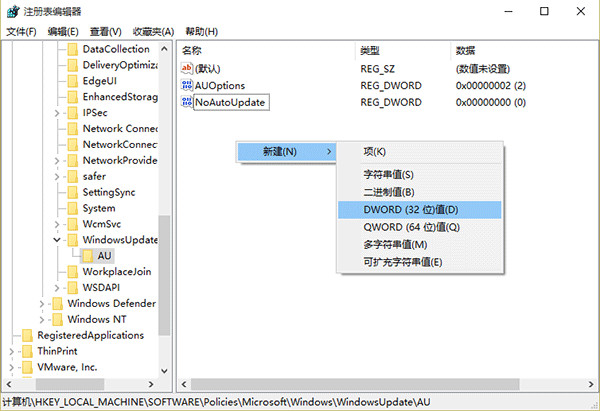
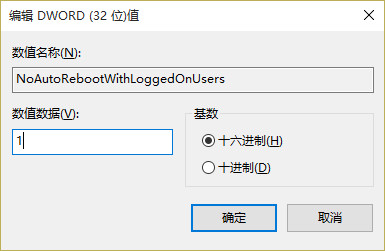
regedit
HKEY_LOCAL_MACHINE\SOFTWARE\Policies\Microsoft\Windows\WindowsUpdate\AU
Win10 滑鼠右鍵反應緩慢?修改登錄表快速解決
Win10 玩《進擊的巨人》無法切換視窗模式?刪除登錄 KoeiTecmo 項修復
Windows 10 筆電開啟內建 Wi-Fi 熱點 (SoftAP) 教學:netsh 指令三步完成
Win10 任務列通知區域找回 QQ 圖示
Win10 如何合併磁碟分割?磁碟管理刪除分割區擴展卷
Windows 10 介面變革:開始選單、資料夾與圖示全面更新
Win10 運行 MATLAB 7.0 提示 Runtime Error:相容模式解決
Windows 10 Build 10586.164 雙系統 (PC/行動裝置) 更新內容彙總