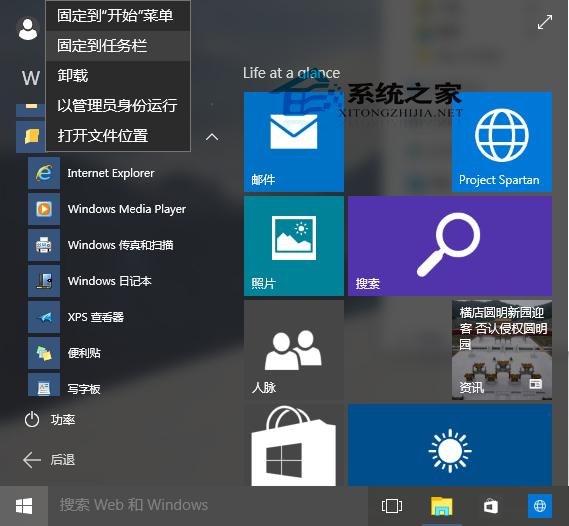
10074 工作列預設僅有 Edge,IE 隱藏於「所有應用→Windows 配件」,兩步釘選回工作列。
C:\Program Files (x86)\Internet Explorer\iexplore.exe
替代方案:設定 .html 等檔案關聯 IE,雙擊網頁檔即自動啟動 IE。
.html
Win10 取得成員版本(Insider Preview)灰色無法點擊?隱私設定一鍵解決
Windows 10 雙軌更新機制解析:Opt-in 快速通道與 Lock-down 穩定通道詳細對比
Windows 10 建立還原點與系統還原完整圖文教學
Win10 通用版 Starbucks 應用何時上架?已送審商店、最後測試中、預估數週內釋出
Win10 9926 設定對話框顯示時間太短?控制台 → 簡易存取中心 → 專注工作 → 調整通知對話框保留時間
Windows Hello 完整設定教學:刷臉登入、指紋辨識與虹膜解鎖
Windows 10 付費應用推廣碼功能上線:開發者每半年可生成 250 組碼
Windows 10 登出/登出在哪?開始選單電源鍵無登出,按 Alt+F4 呼叫「關閉 Windows」選單選擇登出